
verticapy.machine_learning.memmodel.tree.NonBinaryTree
- class verticapy.machine_learning.memmodel.tree.NonBinaryTree(tree: dict, classes: Annotated[list | ndarray, 'Array Like Structure'] | None = None)
InMemoryModelimplementation of non-binary trees.Parameters
- tree: dict
A
NonBinaryTreetree.NonBinaryTreecan be generated with thevDataFrame.chaid()method.- classes: ArrayLike, optional
The classes for the non-binary tree model.
Attributes
Attributes are identical to the input parameters, followed by an underscore (‘_’).
Examples
Initalization
Import the required module.
from verticapy.machine_learning.memmodel.tree import NonBinaryTree
A NonBinaryTree tree model is defined by the non-binary decision tree and name of classes.
We will first generate a non-binary tree using
vDataFrame.chaid()method. For this example, we will use the Titanic dataset.import verticapy.datasets as vpd data = vpd.load_titanic()
 123pclass123survivedAbcAbcsex123age123sibsp123parchAbcticket123fareAbccabinAbcembarkedAbcboat123bodyAbchome.dest
1 1 0 female 2.0 1 2 113781 151.55 C22 C26 S [null] [null] Montreal, PQ / Chesterville, ON 2 1 0 male 30.0 1 2 113781 151.55 C22 C26 S [null] 135 Montreal, PQ / Chesterville, ON 3 1 0 female 25.0 1 2 113781 151.55 C22 C26 S [null] [null] Montreal, PQ / Chesterville, ON 4 1 0 male 39.0 0 0 112050 0.0 A36 S [null] [null] Belfast, NI 5 1 0 male 71.0 0 0 PC 17609 49.5042 [null] C [null] 22 Montevideo, Uruguay 6 1 0 male 47.0 1 0 PC 17757 227.525 C62 C64 C [null] 124 New York, NY 7 1 0 male [null] 0 0 PC 17318 25.925 [null] S [null] [null] New York, NY 8 1 0 male 24.0 0 1 PC 17558 247.5208 B58 B60 C [null] [null] Montreal, PQ 9 1 0 male 36.0 0 0 13050 75.2417 C6 C A [null] Winnipeg, MN 10 1 0 male 25.0 0 0 13905 26.0 [null] C [null] 148 San Francisco, CA 11 1 0 male 45.0 0 0 113784 35.5 T S [null] [null] Trenton, NJ 12 1 0 male 42.0 0 0 110489 26.55 D22 S [null] [null] London / Winnipeg, MB 13 1 0 male 41.0 0 0 113054 30.5 A21 S [null] [null] Pomeroy, WA 14 1 0 male 48.0 0 0 PC 17591 50.4958 B10 C [null] 208 Omaha, NE 15 1 0 male [null] 0 0 112379 39.6 [null] C [null] [null] Philadelphia, PA 16 1 0 male 45.0 0 0 113050 26.55 B38 S [null] [null] Washington, DC 17 1 0 male [null] 0 0 113798 31.0 [null] S [null] [null] [null] 18 1 0 male 33.0 0 0 695 5.0 B51 B53 B55 S [null] [null] New York, NY 19 1 0 male 28.0 0 0 113059 47.1 [null] S [null] [null] Montevideo, Uruguay 20 1 0 male 17.0 0 0 113059 47.1 [null] S [null] [null] Montevideo, Uruguay 21 1 0 male 49.0 0 0 19924 26.0 [null] S [null] [null] Ascot, Berkshire / Rochester, NY 22 1 0 male 36.0 1 0 19877 78.85 C46 S [null] 172 Little Onn Hall, Staffs 23 1 0 male 46.0 1 0 W.E.P. 5734 61.175 E31 S [null] [null] Amenia, ND 24 1 0 male [null] 0 0 112051 0.0 [null] S [null] [null] Liverpool, England / Belfast 25 1 0 male 27.0 1 0 13508 136.7792 C89 C [null] [null] Los Angeles, CA 26 1 0 male [null] 0 0 110465 52.0 A14 S [null] [null] Stoughton, MA 27 1 0 male 47.0 0 0 5727 25.5875 E58 S [null] [null] Victoria, BC 28 1 0 male 37.0 1 1 PC 17756 83.1583 E52 C [null] [null] Lakewood, NJ 29 1 0 male [null] 0 0 113791 26.55 [null] S [null] [null] Roachdale, IN 30 1 0 male 70.0 1 1 WE/P 5735 71.0 B22 S [null] 269 Milwaukee, WI 31 1 0 male 39.0 1 0 PC 17599 71.2833 C85 C [null] [null] New York, NY 32 1 0 male 31.0 1 0 F.C. 12750 52.0 B71 S [null] [null] Montreal, PQ 33 1 0 male 50.0 1 0 PC 17761 106.425 C86 C [null] 62 Deephaven, MN / Cedar Rapids, IA 34 1 0 male 39.0 0 0 PC 17580 29.7 A18 C [null] 133 Philadelphia, PA 35 1 0 female 36.0 0 0 PC 17531 31.6792 A29 C [null] [null] New York, NY 36 1 0 male [null] 0 0 PC 17483 221.7792 C95 S [null] [null] [null] 37 1 0 male 30.0 0 0 113051 27.75 C111 C [null] [null] New York, NY 38 1 0 male 19.0 3 2 19950 263.0 C23 C25 C27 S [null] [null] Winnipeg, MB 39 1 0 male 64.0 1 4 19950 263.0 C23 C25 C27 S [null] [null] Winnipeg, MB 40 1 0 male [null] 0 0 113778 26.55 D34 S [null] [null] Westcliff-on-Sea, Essex 41 1 0 male [null] 0 0 112058 0.0 B102 S [null] [null] [null] 42 1 0 male 37.0 1 0 113803 53.1 C123 S [null] [null] Scituate, MA 43 1 0 male 47.0 0 0 111320 38.5 E63 S [null] 275 St Anne's-on-Sea, Lancashire 44 1 0 male 24.0 0 0 PC 17593 79.2 B86 C [null] [null] [null] 45 1 0 male 71.0 0 0 PC 17754 34.6542 A5 C [null] [null] New York, NY 46 1 0 male 38.0 0 1 PC 17582 153.4625 C91 S [null] 147 Winnipeg, MB 47 1 0 male 46.0 0 0 PC 17593 79.2 B82 B84 C [null] [null] New York, NY 48 1 0 male [null] 0 0 113796 42.4 [null] S [null] [null] [null] 49 1 0 male 45.0 1 0 36973 83.475 C83 S [null] [null] New York, NY 50 1 0 male 40.0 0 0 112059 0.0 B94 S [null] 110 [null] 51 1 0 male 55.0 1 1 12749 93.5 B69 S [null] 307 Montreal, PQ 52 1 0 male 42.0 0 0 113038 42.5 B11 S [null] [null] London / Middlesex 53 1 0 male [null] 0 0 17463 51.8625 E46 S [null] [null] Brighton, MA 54 1 0 male 55.0 0 0 680 50.0 C39 S [null] [null] London / Birmingham 55 1 0 male 42.0 1 0 113789 52.0 [null] S [null] 38 New York, NY 56 1 0 male [null] 0 0 PC 17600 30.6958 [null] C 14 [null] New York, NY 57 1 0 female 50.0 0 0 PC 17595 28.7125 C49 C [null] [null] Paris, France New York, NY 58 1 0 male 46.0 0 0 694 26.0 [null] S [null] 80 Bennington, VT 59 1 0 male 50.0 0 0 113044 26.0 E60 S [null] [null] London 60 1 0 male 32.5 0 0 113503 211.5 C132 C [null] 45 [null] 61 1 0 male 58.0 0 0 11771 29.7 B37 C [null] 258 Buffalo, NY 62 1 0 male 41.0 1 0 17464 51.8625 D21 S [null] [null] Southington / Noank, CT 63 1 0 male [null] 0 0 113028 26.55 C124 S [null] [null] Portland, OR 64 1 0 male [null] 0 0 PC 17612 27.7208 [null] C [null] [null] Chicago, IL 65 1 0 male 29.0 0 0 113501 30.0 D6 S [null] 126 Springfield, MA 66 1 0 male 30.0 0 0 113801 45.5 [null] S [null] [null] London / New York, NY 67 1 0 male 30.0 0 0 110469 26.0 C106 S [null] [null] Brockton, MA 68 1 0 male 19.0 1 0 113773 53.1 D30 S [null] [null] New York, NY 69 1 0 male 46.0 0 0 13050 75.2417 C6 C [null] 292 Vancouver, BC 70 1 0 male 54.0 0 0 17463 51.8625 E46 S [null] 175 Dorchester, MA 71 1 0 male 28.0 1 0 PC 17604 82.1708 [null] C [null] [null] New York, NY 72 1 0 male 65.0 0 0 13509 26.55 E38 S [null] 249 East Bridgewater, MA 73 1 0 male 44.0 2 0 19928 90.0 C78 Q [null] 230 Fond du Lac, WI 74 1 0 male 55.0 0 0 113787 30.5 C30 S [null] [null] Montreal, PQ 75 1 0 male 47.0 0 0 113796 42.4 [null] S [null] [null] Washington, DC 76 1 0 male 37.0 0 1 PC 17596 29.7 C118 C [null] [null] Brooklyn, NY 77 1 0 male 58.0 0 2 35273 113.275 D48 C [null] 122 Lexington, MA 78 1 0 male 64.0 0 0 693 26.0 [null] S [null] 263 Isle of Wight, England 79 1 0 male 65.0 0 1 113509 61.9792 B30 C [null] 234 Providence, RI 80 1 0 male 28.5 0 0 PC 17562 27.7208 D43 C [null] 189 ?Havana, Cuba 81 1 0 male [null] 0 0 112052 0.0 [null] S [null] [null] Belfast 82 1 0 male 45.5 0 0 113043 28.5 C124 S [null] 166 Surbiton Hill, Surrey 83 1 0 male 23.0 0 0 12749 93.5 B24 S [null] [null] Montreal, PQ 84 1 0 male 29.0 1 0 113776 66.6 C2 S [null] [null] Isleworth, England 85 1 0 male 18.0 1 0 PC 17758 108.9 C65 C [null] [null] Madrid, Spain 86 1 0 male 47.0 0 0 110465 52.0 C110 S [null] 207 Worcester, MA 87 1 0 male 38.0 0 0 19972 0.0 [null] S [null] [null] Rotterdam, Netherlands 88 1 0 male 22.0 0 0 PC 17760 135.6333 [null] C [null] 232 [null] 89 1 0 male [null] 0 0 PC 17757 227.525 [null] C [null] [null] [null] 90 1 0 male 31.0 0 0 PC 17590 50.4958 A24 S [null] [null] Trenton, NJ 91 1 0 male [null] 0 0 113767 50.0 A32 S [null] [null] Seattle, WA 92 1 0 male 36.0 0 0 13049 40.125 A10 C [null] [null] Winnipeg, MB 93 1 0 male 55.0 1 0 PC 17603 59.4 [null] C [null] [null] New York, NY 94 1 0 male 33.0 0 0 113790 26.55 [null] S [null] 109 London 95 1 0 male 61.0 1 3 PC 17608 262.375 B57 B59 B63 B66 C [null] [null] Haverford, PA / Cooperstown, NY 96 1 0 male 50.0 1 0 13507 55.9 E44 S [null] [null] Duluth, MN 97 1 0 male 56.0 0 0 113792 26.55 [null] S [null] [null] New York, NY 98 1 0 male 56.0 0 0 17764 30.6958 A7 C [null] [null] St James, Long Island, NY 99 1 0 male 24.0 1 0 13695 60.0 C31 S [null] [null] Huntington, WV 100 1 0 male [null] 0 0 113056 26.0 A19 S [null] [null] Streatham, Surrey Rows: 1-100 | Columns: 14Note
VerticaPy offers a wide range of sample datasets that are ideal for training and testing purposes. You can explore the full list of available datasets in the Datasets, which provides detailed information on each dataset and how to use them effectively. These datasets are invaluable resources for honing your data analysis and machine learning skills within the VerticaPy environment.
Lets create a non-binary tree using
vDataFrame.chaid()method.tree = data.chaid("survived", ["sex", "fare"]).tree_
Our non-binary tree is ready, we will now provide information about classes and create a
NonBinaryTreemodel.classes = ["a", "b"] model_nbt = NonBinaryTree(tree, classes)
Create a dataset.
data = [["male", 100], ["female", 20], ["female", 50]]
Making In-Memory Predictions
Use
predict()method to do predictions.model_nbt.predict(data) Out[6]: array(['a', 'b', 'b'], dtype='<U1')
Use
predict_proba()method to compute the predicted probabilities for each class.model_nbt.predict_proba(data) Out[7]: array([[0.82129278, 0.17870722], [0.3042328 , 0.6957672 ], [0.3042328 , 0.6957672 ]])
Deploy SQL Code
Let’s use the following column names:
cnames = ["sex", "fare"]
Use
predict_sql()method to get the SQL code needed to deploy the model using its attributes.model_nbt.predict_sql(cnames) Out[9]: "(CASE WHEN sex = 'female' THEN (CASE WHEN fare <= 127.6 THEN 'b' WHEN fare <= 255.2 THEN 'b' WHEN fare <= 382.8 THEN 'b' WHEN fare <= 638.0 THEN 'b' ELSE NULL END) WHEN sex = 'male' THEN (CASE WHEN fare <= 129.36 THEN 'a' WHEN fare <= 258.72 THEN 'a' WHEN fare <= 388.08 THEN 'a' WHEN fare <= 517.44 THEN 'b' ELSE NULL END) ELSE NULL END)"
Use
predict_proba_sql()method to get the SQL code needed to deploy the model that computes predicted probabilities.model_nbt.predict_proba_sql(cnames) Out[10]: ["(CASE WHEN sex = 'female' THEN (CASE WHEN fare <= 127.6 THEN 0.304232804232804 WHEN fare <= 255.2 THEN 0.09375 WHEN fare <= 382.8 THEN 0.0 WHEN fare <= 638.0 THEN 0.0 ELSE NULL END) WHEN sex = 'male' THEN (CASE WHEN fare <= 129.36 THEN 0.821292775665399 WHEN fare <= 258.72 THEN 0.777777777777778 WHEN fare <= 388.08 THEN 0.75 WHEN fare <= 517.44 THEN 0.0 ELSE NULL END) ELSE NULL END)", "(CASE WHEN sex = 'female' THEN (CASE WHEN fare <= 127.6 THEN 0.695767195767196 WHEN fare <= 255.2 THEN 0.90625 WHEN fare <= 382.8 THEN 1.0 WHEN fare <= 638.0 THEN 1.0 ELSE NULL END) WHEN sex = 'male' THEN (CASE WHEN fare <= 129.36 THEN 0.178707224334601 WHEN fare <= 258.72 THEN 0.222222222222222 WHEN fare <= 388.08 THEN 0.25 WHEN fare <= 517.44 THEN 1.0 ELSE NULL END) ELSE NULL END)"]
Hint
This object can be pickled and used in any in-memory environment, just like SKLEARN models.
Drawing Tree
Use
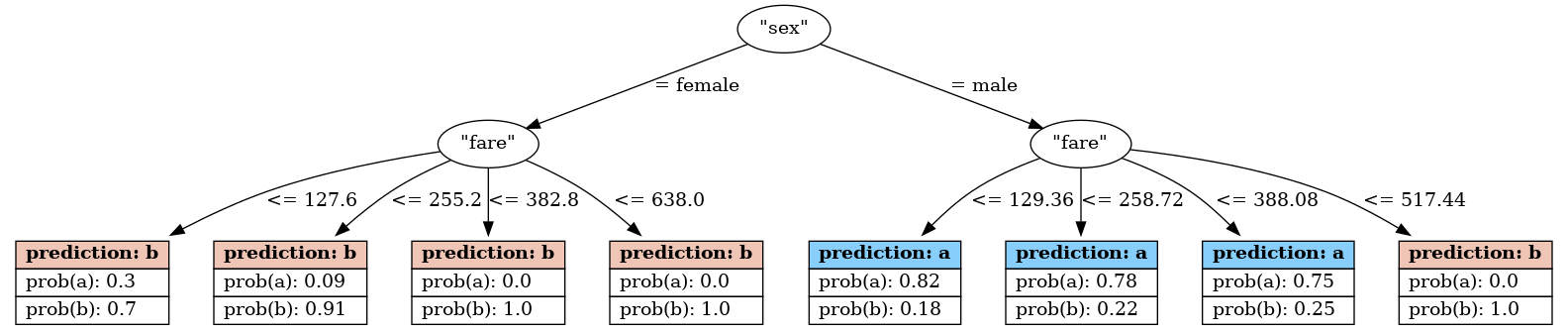
to_graphviz()method to generate code for a Graphviz tree.model_nbt.to_graphviz() Out[11]: 'digraph Tree {\ngraph [bgcolor="#FFFFFFDD"];\n0 [label="\\"sex\\"", fillcolor="#FFFFFFDD", fontcolor="#000000", color="#000000"]\n0 -> 1[label="= female", color="#000000", fontcolor="#000000"]\n1 [label="\\"fare\\"", fillcolor="#FFFFFFDD", fontcolor="#000000", color="#000000"]\n1 -> 2[label="<= 127.6", color="#000000", fontcolor="#000000"]2 [label=<<table border="0" cellspacing="0"><tr><td port="port1" border="1" bgcolor="#efc5b5"><b> prediction: b </b></td></tr><tr><td port="port0" border="1" align="left"> prob(a): 0.3 </td></tr><tr><td port="port1" border="1" align="left"> prob(b): 0.7 </td></tr></table>>, fillcolor="#FFFFFFDD", fontcolor="#000000", shape="none", color="#000000"]\n1 [label="\\"fare\\"", fillcolor="#FFFFFFDD", fontcolor="#000000", color="#000000"]\n1 -> 3[label="<= 255.2", color="#000000", fontcolor="#000000"]3 [label=<<table border="0" cellspacing="0"><tr><td port="port1" border="1" bgcolor="#efc5b5"><b> prediction: b </b></td></tr><tr><td port="port0" border="1" align="left"> prob(a): 0.09 </td></tr><tr><td port="port1" border="1" align="left"> prob(b): 0.91 </td></tr></table>>, fillcolor="#FFFFFFDD", fontcolor="#000000", shape="none", color="#000000"]\n1 [label="\\"fare\\"", fillcolor="#FFFFFFDD", fontcolor="#000000", color="#000000"]\n1 -> 4[label="<= 382.8", color="#000000", fontcolor="#000000"]4 [label=<<table border="0" cellspacing="0"><tr><td port="port1" border="1" bgcolor="#efc5b5"><b> prediction: b </b></td></tr><tr><td port="port0" border="1" align="left"> prob(a): 0.0 </td></tr><tr><td port="port1" border="1" align="left"> prob(b): 1.0 </td></tr></table>>, fillcolor="#FFFFFFDD", fontcolor="#000000", shape="none", color="#000000"]\n1 [label="\\"fare\\"", fillcolor="#FFFFFFDD", fontcolor="#000000", color="#000000"]\n1 -> 5[label="<= 638.0", color="#000000", fontcolor="#000000"]5 [label=<<table border="0" cellspacing="0"><tr><td port="port1" border="1" bgcolor="#efc5b5"><b> prediction: b </b></td></tr><tr><td port="port0" border="1" align="left"> prob(a): 0.0 </td></tr><tr><td port="port1" border="1" align="left"> prob(b): 1.0 </td></tr></table>>, fillcolor="#FFFFFFDD", fontcolor="#000000", shape="none", color="#000000"]\n0 [label="\\"sex\\"", fillcolor="#FFFFFFDD", fontcolor="#000000", color="#000000"]\n0 -> 6[label="= male", color="#000000", fontcolor="#000000"]\n6 [label="\\"fare\\"", fillcolor="#FFFFFFDD", fontcolor="#000000", color="#000000"]\n6 -> 7[label="<= 129.36", color="#000000", fontcolor="#000000"]7 [label=<<table border="0" cellspacing="0"><tr><td port="port1" border="1" bgcolor="#87cefa"><b> prediction: a </b></td></tr><tr><td port="port0" border="1" align="left"> prob(a): 0.82 </td></tr><tr><td port="port1" border="1" align="left"> prob(b): 0.18 </td></tr></table>>, fillcolor="#FFFFFFDD", fontcolor="#000000", shape="none", color="#000000"]\n6 [label="\\"fare\\"", fillcolor="#FFFFFFDD", fontcolor="#000000", color="#000000"]\n6 -> 8[label="<= 258.72", color="#000000", fontcolor="#000000"]8 [label=<<table border="0" cellspacing="0"><tr><td port="port1" border="1" bgcolor="#87cefa"><b> prediction: a </b></td></tr><tr><td port="port0" border="1" align="left"> prob(a): 0.78 </td></tr><tr><td port="port1" border="1" align="left"> prob(b): 0.22 </td></tr></table>>, fillcolor="#FFFFFFDD", fontcolor="#000000", shape="none", color="#000000"]\n6 [label="\\"fare\\"", fillcolor="#FFFFFFDD", fontcolor="#000000", color="#000000"]\n6 -> 9[label="<= 388.08", color="#000000", fontcolor="#000000"]9 [label=<<table border="0" cellspacing="0"><tr><td port="port1" border="1" bgcolor="#87cefa"><b> prediction: a </b></td></tr><tr><td port="port0" border="1" align="left"> prob(a): 0.75 </td></tr><tr><td port="port1" border="1" align="left"> prob(b): 0.25 </td></tr></table>>, fillcolor="#FFFFFFDD", fontcolor="#000000", shape="none", color="#000000"]\n6 [label="\\"fare\\"", fillcolor="#FFFFFFDD", fontcolor="#000000", color="#000000"]\n6 -> 10[label="<= 517.44", color="#000000", fontcolor="#000000"]10 [label=<<table border="0" cellspacing="0"><tr><td port="port1" border="1" bgcolor="#efc5b5"><b> prediction: b </b></td></tr><tr><td port="port0" border="1" align="left"> prob(a): 0.0 </td></tr><tr><td port="port1" border="1" align="left"> prob(b): 1.0 </td></tr></table>>, fillcolor="#FFFFFFDD", fontcolor="#000000", shape="none", color="#000000"]\n}'
Use
plot_tree()method to draw the input tree.model_nbt.plot_tree()
Important
plot_tree()requires the Graphviz module.Note
The above example is a very basic one. For other more detailed examples and customization options, please see :ref:`chart_gallery.tree`_
- __init__(tree: dict, classes: Annotated[list | ndarray, 'Array Like Structure'] | None = None) None
Methods
__init__(tree[, classes])Returns the model attributes.
plot_tree([pic_path])Draws the input tree.
predict(X)Predicts using the CHAID model.
Returns probabilities using the CHAID model.
Returns the SQL code needed to deploy the model probabilities.
predict_sql(X)Returns the SQL code needed to deploy the model using its attributes.
set_attributes(**kwargs)Sets the model attributes.
to_graphviz([classes_color, round_pred, ...])Returns the code for a Graphviz tree.
Attributes
Must be overridden in child class