
Getting started with Query Profiler
This starter notebook will help you get up and running with the Query Profiler (QueryProfiler) tool in VerticaPyLab and demonstrate functionality through various examples and use cases.
This tool is a work in progress and the VerticaPy team is continuously adding new features.
See also QueryProfiler ,
QueryProfilerInterface ,
QueryProfilerComparison .
VerticaPyLab
The easiest way to use the QueryProfiler tool is through VerticaPyLab. For installation instructions, see Getting Started .
Before using the QueryProfiler tool, confirm that you are connected to a Vertica database. If not, follow the connection instructions in a Jupyter notebook or connect using the Connect option on the VerticaPyLab homepage.
QueryProfiler
The QueryProfiler object is a python object that includes many built-in methods for analyzing queries and their performance. There are a few different ways to create a QueryProfiler object.
Create and save a QueryProfiler object
First, import the verticapy package and load the datasets:
import verticapy as vp
from verticapy.datasets import load_titanic, load_amazon
# load datasets
titanic = load_titanic()
amazon = load_amazon()
Create QueryProfiler object from transaction id and statement id
Before creating the QueryProfiler object, take a look at the data used by the query:
amazon.head(100)
 | 📅 date100% | ... | Abc state100% | 123 number100% |
| 1 | 1998-01-01 | ... | AMAPÁ | 0 |
| 2 | 1998-01-01 | ... | AMAZONAS | 0 |
| 3 | 1998-01-01 | ... | DISTRITO FEDERAL | 0 |
| 4 | 1998-01-01 | ... | ESPÍRITO SANTO | 0 |
| 5 | 1998-01-01 | ... | MARANHÃO | 0 |
| 6 | 1998-01-01 | ... | PARANÁ | 0 |
| 7 | 1998-01-01 | ... | PIAUÍ | 0 |
| 8 | 1998-01-01 | ... | RORAIMA | 0 |
| 9 | 1998-01-01 | ... | SERGIPE | 0 |
| 10 | 1998-01-01 | ... | SÃO PAULO | 0 |
| 11 | 1998-02-01 | ... | GOIÁS | 0 |
| 12 | 1998-02-01 | ... | MATO GROSSO DO SUL | 0 |
| 13 | 1998-02-01 | ... | MINAS GERAIS | 0 |
| 14 | 1998-02-01 | ... | PARAÍBA | 0 |
| 15 | 1998-02-01 | ... | SANTA CATARINA | 0 |
| 16 | 1998-02-01 | ... | SÃO PAULO | 0 |
| 17 | 1998-03-01 | ... | AMAPÁ | 0 |
| 18 | 1998-03-01 | ... | BAHIA | 0 |
| 19 | 1998-03-01 | ... | MATO GROSSO DO SUL | 0 |
| 20 | 1998-03-01 | ... | PARÁ | 0 |
| 21 | 1998-03-01 | ... | PERNAMBUCO | 0 |
| 22 | 1998-03-01 | ... | RIO GRANDE DO SUL | 0 |
| 23 | 1998-04-01 | ... | CEARÁ | 0 |
| 24 | 1998-04-01 | ... | PARANÁ | 0 |
| 25 | 1998-04-01 | ... | PARAÍBA | 0 |
| 26 | 1998-04-01 | ... | PARÁ | 0 |
| 27 | 1998-05-01 | ... | ALAGOAS | 0 |
| 28 | 1998-05-01 | ... | AMAPÁ | 0 |
| 29 | 1998-05-01 | ... | MARANHÃO | 0 |
| 30 | 1998-05-01 | ... | MATO GROSSO DO SUL | 0 |
| 31 | 1998-05-01 | ... | RIO GRANDE DO SUL | 0 |
| 32 | 1998-05-01 | ... | TOCANTINS | 0 |
| 33 | 1998-06-01 | ... | ESPÍRITO SANTO | 6 |
| 34 | 1998-06-01 | ... | RIO DE JANEIRO | 3 |
| 35 | 1998-06-01 | ... | RIO GRANDE DO NORTE | 1 |
| 36 | 1998-06-01 | ... | SÃO PAULO | 451 |
| 37 | 1998-07-01 | ... | ESPÍRITO SANTO | 37 |
| 38 | 1998-07-01 | ... | MARANHÃO | 274 |
| 39 | 1998-07-01 | ... | MATO GROSSO | 360 |
| 40 | 1998-07-01 | ... | MATO GROSSO DO SUL | 3712 |
| 41 | 1998-07-01 | ... | PARAÍBA | 0 |
| 42 | 1998-07-01 | ... | PARÁ | 638 |
| 43 | 1998-07-01 | ... | RONDÔNIA | 365 |
| 44 | 1998-07-01 | ... | SÃO PAULO | 596 |
| 45 | 1998-08-01 | ... | ALAGOAS | 1 |
| 46 | 1998-08-01 | ... | BAHIA | 815 |
| 47 | 1998-08-01 | ... | DISTRITO FEDERAL | 48 |
| 48 | 1998-08-01 | ... | ESPÍRITO SANTO | 38 |
| 49 | 1998-08-01 | ... | MARANHÃO | 1176 |
| 50 | 1998-08-01 | ... | MATO GROSSO | 228 |
| 51 | 1998-08-01 | ... | MINAS GERAIS | 875 |
| 52 | 1998-08-01 | ... | PIAUÍ | 711 |
| 53 | 1998-08-01 | ... | RIO GRANDE DO SUL | 9 |
| 54 | 1998-08-01 | ... | RORAIMA | 0 |
| 55 | 1998-08-01 | ... | SERGIPE | 0 |
| 56 | 1998-09-01 | ... | AMAPÁ | 20 |
| 57 | 1998-09-01 | ... | DISTRITO FEDERAL | 33 |
| 58 | 1998-09-01 | ... | PIAUÍ | 1991 |
| 59 | 1998-09-01 | ... | RORAIMA | 2 |
| 60 | 1998-10-01 | ... | AMAZONAS | 83 |
| 61 | 1998-10-01 | ... | GOIÁS | 1034 |
| 62 | 1998-10-01 | ... | MATO GROSSO | 576 |
| 63 | 1998-10-01 | ... | PARAÍBA | 179 |
| 64 | 1998-10-01 | ... | PARÁ | 3665 |
| 65 | 1998-10-01 | ... | PIAUÍ | 2586 |
| 66 | 1998-10-01 | ... | SERGIPE | 0 |
| 67 | 1998-11-01 | ... | ALAGOAS | 19 |
| 68 | 1998-11-01 | ... | AMAPÁ | 131 |
| 69 | 1998-11-01 | ... | CEARÁ | 575 |
| 70 | 1998-11-01 | ... | DISTRITO FEDERAL | 0 |
| 71 | 1998-11-01 | ... | MARANHÃO | 2237 |
| 72 | 1998-11-01 | ... | RIO DE JANEIRO | 6 |
| 73 | 1998-11-01 | ... | RIO GRANDE DO SUL | 28 |
| 74 | 1998-11-01 | ... | SÃO PAULO | 488 |
| 75 | 1998-12-01 | ... | BAHIA | 82 |
| 76 | 1998-12-01 | ... | MARANHÃO | 1399 |
| 77 | 1998-12-01 | ... | MATO GROSSO | 100 |
| 78 | 1998-12-01 | ... | PARAÍBA | 51 |
| 79 | 1998-12-01 | ... | PERNAMBUCO | 59 |
| 80 | 1998-12-01 | ... | RIO DE JANEIRO | 1 |
| 81 | 1998-12-01 | ... | RONDÔNIA | 33 |
| 82 | 1998-12-01 | ... | TOCANTINS | 9 |
| 83 | 1999-01-01 | ... | ALAGOAS | 58 |
| 84 | 1999-01-01 | ... | GOIÁS | 14 |
| 85 | 1999-01-01 | ... | MATO GROSSO | 239 |
| 86 | 1999-01-01 | ... | MINAS GERAIS | 36 |
| 87 | 1999-01-01 | ... | PARÁ | 87 |
| 88 | 1999-01-01 | ... | PERNAMBUCO | 102 |
| 89 | 1999-01-01 | ... | RONDÔNIA | 1 |
| 90 | 1999-01-01 | ... | SÃO PAULO | 7 |
| 91 | 1999-01-01 | ... | TOCANTINS | 36 |
| 92 | 1999-02-01 | ... | ACRE | 0 |
| 93 | 1999-02-01 | ... | CEARÁ | 16 |
| 94 | 1999-02-01 | ... | MATO GROSSO | 69 |
| 95 | 1999-02-01 | ... | MATO GROSSO DO SUL | 28 |
| 96 | 1999-02-01 | ... | PERNAMBUCO | 13 |
| 97 | 1999-02-01 | ... | RONDÔNIA | 1 |
| 98 | 1999-02-01 | ... | SANTA CATARINA | 2 |
| 99 | 1999-02-01 | ... | TOCANTINS | 1 |
| 100 | 1999-03-01 | ... | AMAPÁ | 2 |
titanic.head(100)
| 123 pclass100% | ... | 123 body9% | Abc 57% |
| 1 | 1 | ... | 22 | |
| 2 | 1 | ... | [null] | |
| 3 | 1 | ... | [null] | |
| 4 | 1 | ... | [null] | |
| 5 | 1 | ... | [null] | |
| 6 | 1 | ... | [null] | |
| 7 | 1 | ... | [null] | |
| 8 | 1 | ... | 62 | |
| 9 | 1 | ... | [null] | |
| 10 | 1 | ... | [null] | |
| 11 | 1 | ... | [null] | |
| 12 | 1 | ... | [null] | |
| 13 | 1 | ... | 110 | |
| 14 | 1 | ... | [null] | |
| 15 | 1 | ... | [null] | |
| 16 | 1 | ... | 38 | |
| 17 | 1 | ... | [null] | |
| 18 | 1 | ... | 126 | |
| 19 | 1 | ... | 292 | |
| 20 | 1 | ... | 175 | |
| 21 | 1 | ... | [null] | |
| 22 | 1 | ... | 122 | |
| 23 | 1 | ... | 166 | |
| 24 | 1 | ... | [null] | |
| 25 | 1 | ... | 207 | |
| 26 | 1 | ... | [null] | |
| 27 | 1 | ... | 232 | |
| 28 | 1 | ... | [null] | |
| 29 | 1 | ... | [null] | |
| 30 | 1 | ... | [null] | |
| 31 | 1 | ... | [null] | |
| 32 | 1 | ... | [null] | |
| 33 | 1 | ... | 46 | |
| 34 | 1 | ... | 169 | |
| 35 | 1 | ... | [null] | |
| 36 | 1 | ... | [null] | |
| 37 | 1 | ... | [null] | |
| 38 | 1 | ... | [null] | |
| 39 | 1 | ... | [null] | |
| 40 | 1 | ... | [null] | |
| 41 | 1 | ... | [null] | |
| 42 | 1 | ... | [null] | |
| 43 | 1 | ... | [null] | |
| 44 | 1 | ... | [null] | |
| 45 | 1 | ... | [null] | |
| 46 | 1 | ... | [null] | |
| 47 | 1 | ... | [null] | |
| 48 | 1 | ... | [null] | |
| 49 | 1 | ... | [null] | |
| 50 | 1 | ... | [null] | |
| 51 | 1 | ... | [null] | |
| 52 | 1 | ... | [null] | |
| 53 | 1 | ... | [null] | |
| 54 | 1 | ... | [null] | |
| 55 | 1 | ... | [null] | |
| 56 | 1 | ... | [null] | |
| 57 | 1 | ... | [null] | |
| 58 | 1 | ... | [null] | |
| 59 | 1 | ... | [null] | |
| 60 | 1 | ... | [null] | |
| 61 | 1 | ... | [null] | |
| 62 | 1 | ... | [null] | |
| 63 | 1 | ... | [null] | |
| 64 | 1 | ... | [null] | |
| 65 | 1 | ... | [null] | |
| 66 | 1 | ... | [null] | |
| 67 | 1 | ... | [null] | |
| 68 | 1 | ... | [null] | |
| 69 | 1 | ... | [null] | |
| 70 | 1 | ... | [null] | |
| 71 | 1 | ... | [null] | |
| 72 | 1 | ... | [null] | |
| 73 | 1 | ... | [null] | |
| 74 | 2 | ... | [null] | |
| 75 | 2 | ... | [null] | |
| 76 | 2 | ... | [null] | |
| 77 | 2 | ... | [null] | |
| 78 | 2 | ... | [null] | |
| 79 | 2 | ... | [null] | |
| 80 | 2 | ... | [null] | |
| 81 | 2 | ... | [null] | |
| 82 | 2 | ... | [null] | |
| 83 | 2 | ... | 236 | |
| 84 | 2 | ... | [null] | |
| 85 | 2 | ... | [null] | |
| 86 | 2 | ... | [null] | |
| 87 | 2 | ... | 155 | |
| 88 | 2 | ... | [null] | |
| 89 | 2 | ... | 75 | |
| 90 | 2 | ... | 35 | |
| 91 | 2 | ... | [null] | |
| 92 | 2 | ... | [null] | |
| 93 | 2 | ... | [null] | |
| 94 | 2 | ... | [null] | |
| 95 | 2 | ... | [null] | |
| 96 | 2 | ... | [null] | |
| 97 | 2 | ... | [null] | |
| 98 | 2 | ... | 165 | |
| 99 | 2 | ... | [null] | |
| 100 | 2 | ... | [null] |
We can now run some queries to create a QueryProfiler object. One way to do so is by using the queries statement_id and transaction_id.
To allow for SQL execution in Jupyter cells, load the sql extension:
%load_ext verticapy.sql
The verticapy.sql extension is already loaded. To reload it, use:
%reload_ext verticapy.sql
Next, let us run the queries:
%%sql
SELECT
date,
MONTH(date) as month,
AVG(number) as avg_number_test
FROM public.amazon
GROUP BY date
ORDER BY avg_number_test DESC;
| 📅 date100% | ... | 123 month100% | 123 avg_number_test100% |
| 1 | 2007-09-01 | ... | 9 | 3500.96296296296 |
| 2 | 2010-09-01 | ... | 9 | 3163.25925925926 |
| 3 | 2003-09-01 | ... | 9 | 2826.85185185185 |
| 4 | 2015-09-01 | ... | 9 | 2669.74074074074 |
| 5 | 2002-08-01 | ... | 8 | 2116.7037037037 |
| 6 | 2005-08-01 | ... | 8 | 1925.22222222222 |
| 7 | 2002-10-01 | ... | 10 | 1767.48148148148 |
| 8 | 2003-10-01 | ... | 10 | 1603.51851851852 |
| 9 | 2004-10-01 | ... | 10 | 1493.74074074074 |
| 10 | 2008-09-01 | ... | 9 | 1460.92592592593 |
| 11 | 2012-10-01 | ... | 10 | 1267.14814814815 |
| 12 | 2013-09-01 | ... | 9 | 1169.81481481481 |
| 13 | 2016-10-01 | ... | 10 | 1118.88888888889 |
| 14 | 2009-09-01 | ... | 9 | 1090.0 |
| 15 | 2002-11-01 | ... | 11 | 1043.66666666667 |
| 16 | 2015-11-01 | ... | 11 | 1019.59259259259 |
| 17 | 2000-10-01 | ... | 10 | 1012.44444444444 |
| 18 | 1998-10-01 | ... | 10 | 870.185185185185 |
| 19 | 2000-09-01 | ... | 9 | 862.62962962963 |
| 20 | 2017-07-01 | ... | 7 | 848.555555555556 |
%%sql
SELECT
a.date,
MONTH(a.date) AS month,
AVG(a.number) AS avg_number_test,
b.max_number
FROM
public.amazon AS a
JOIN (
SELECT
date,
MAX(number) AS max_number
FROM
public.amazon
GROUP BY
date
) AS b
ON
a.date = b.date
GROUP BY
a.date, b.max_number
ORDER BY
avg_number_test DESC;
| 📅 date100% | ... | 123 month100% | 123 max_number100% |
| 1 | 2017-09-01 | ... | 9 | 25004 |
| 2 | 2002-09-01 | ... | 9 | 11034 |
| 3 | 2011-09-01 | ... | 9 | 7086 |
| 4 | 2015-10-01 | ... | 10 | 7781 |
| 5 | 2005-10-01 | ... | 10 | 8405 |
| 6 | 2003-08-01 | ... | 8 | 11132 |
| 7 | 2014-08-01 | ... | 8 | 8555 |
| 8 | 1998-09-01 | ... | 9 | 10363 |
| 9 | 1999-08-01 | ... | 8 | 18566 |
| 10 | 2015-08-01 | ... | 8 | 7913 |
| 11 | 2008-10-01 | ... | 10 | 7691 |
| 12 | 1999-09-01 | ... | 9 | 11729 |
| 13 | 1998-08-01 | ... | 8 | 15406 |
| 14 | 2001-10-01 | ... | 10 | 6661 |
| 15 | 2009-10-01 | ... | 10 | 6342 |
| 16 | 2004-07-01 | ... | 7 | 11517 |
| 17 | 2003-11-01 | ... | 11 | 6195 |
| 18 | 2003-12-01 | ... | 12 | 4787 |
| 19 | 2004-06-01 | ... | 6 | 9813 |
| 20 | 2013-11-01 | ... | 11 | 3688 |
In order to create a QueryProfiler object from a query, we need the queries statement_id and transaction_id, both of which are found in the QUERY_REQUESTS system table:
from verticapy.performance.vertica import QueryProfiler, QueryProfilerInterface
qprof = QueryProfiler((45035996273780927,76))
To create a QueryProfiler object w/ multiple queries, provide a list of tuples
qprof = QueryProfilerInterface([(45035996273780927,74), (45035996273780075,6)])
Once the QueryProfiler object is created, you can run the get_queries() method to view the queries contained in the QueryProfiler object:
qprof.get_queries()
| ... | 📅 start_timestamp100% | 📅 end_timestamp100% |
| 0 | ... | 2024-10-31 15:34:08.680296 | 2024-10-31 15:34:08.744459 |
| 1 | ... | 2024-10-31 15:34:14.053410 | 2024-10-31 15:34:14.206118 |
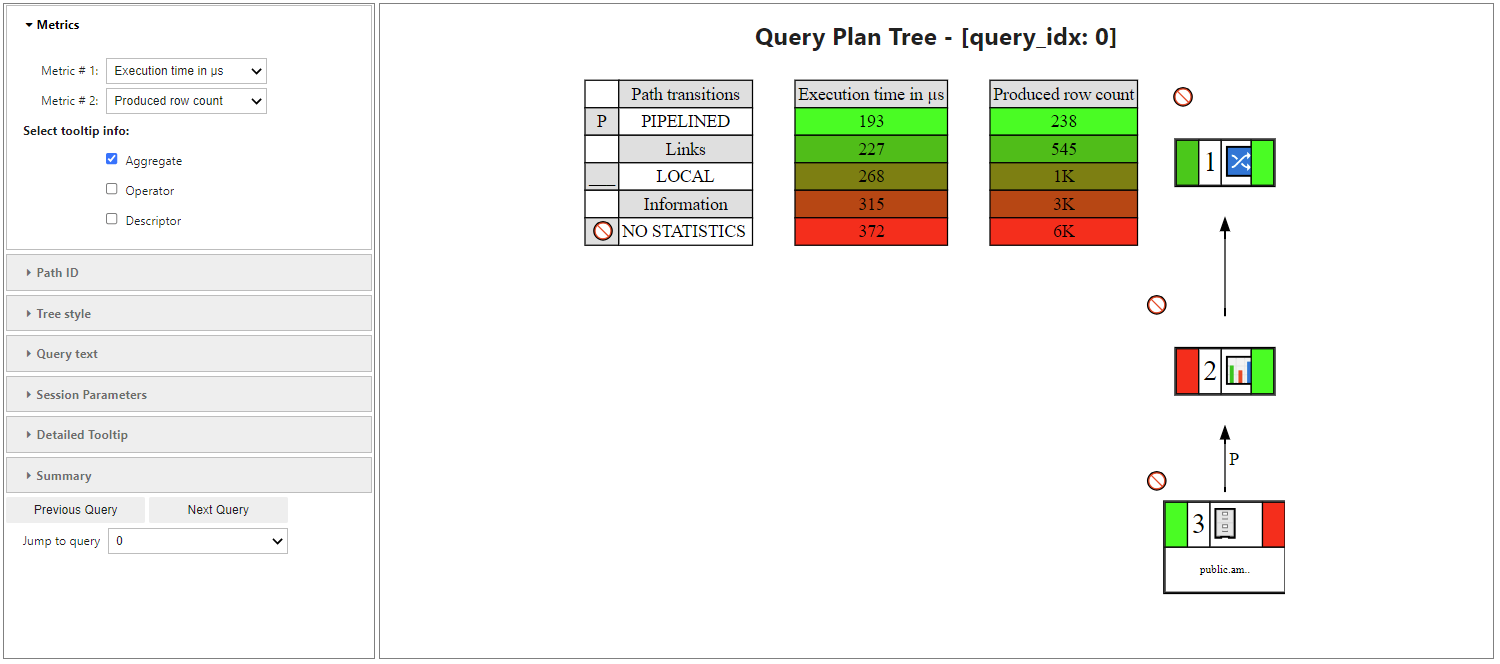
To visualize the query plan, run get_qplan_tree(),
which is customizable, allowing you to specify certain metrics or focus on a specified tree path:
Create a QueryProfiler object directly from a query
You can also create the QueryProfiler Object directly from an SQL Command:
qprof = QueryProfiler("""
select transaction_id, statement_id, request, request_duration
from query_requests where start_timestamp > (now() - interval'1 hour')
order by request_duration desc limit 10;
"""
)
Save the QueryProfiler object in a target schema
After you create a QueryProfiler object, you can save it to a target schema.
In this example, we will save the object to the sc_demo schema:
vp.create_schema("sc_demo")
Out[6]: False
To save the QueryProfiler object, specify the target_schema and, optionally, a key_id (it is a unique key which is used to search for the stored Qprof object) when creating the QueryProfiler object:
# Save it to your schema
qprof = QueryProfiler(
(45035996273780927, 76),
target_schema = "sc_demo",
key_id = "unique_xx1",
overwrite = True,
)
Load a QueryProfiler object
To load a previously saved QueryProfiler, simply provide its target_schema and key_id:
from verticapy.performance.vertica import QueryProfiler, QueryProfilerInterface
# Someone else can now connect to my DB and use the object.
qprof = QueryProfiler(
target_schema = "sc_demo",
key_id = "unique_xx1",
)
Export and import
You can export and import QueryProfiler objects as .tar files.
Export
To export a QueryProfiler object, use the export_profile() method:
qprof.export_profile(filename="test_export_1.tar")
Note
There is also a shell script which helps you export qprof data without python. See qprof_export .
Import
To import a QueryProfiler object, use the import_profile() method and provide the target_schema and key_id.
Make sure the key_id is unique/unused. Let us create a new schema to load this into:
vp.create_schema("sc_demo_1")
qprof = QueryProfiler.import_profile(
target_schema = "sc_demo_1",
key_id = "unique_load_xx1",
filename = "test_export_1.tar",
auto_initialize = True,
)
Methods & attributes
The QueryProfiler object includes many useful methods and attributes to aid in the analysis of query performence.
Access performance tables
With the QueryProfiler object, you can access any of the following tables:
qprof.get_table()
Out[7]:
['dc_requests_issued',
'dc_explain_plans',
'dc_query_executions',
'dc_plan_activities',
'dc_scan_events',
'dc_slow_events',
'execution_engine_profiles',
'host_resources',
'query_events',
'query_plan_profiles',
'query_profiles',
'projection_storage',
'projection_usage',
'resource_pool_status',
'storage_containers',
'dc_lock_attempts',
'dc_plan_resources',
'configuration_parameters',
'query_consumption',
'projections',
'projection_columns',
'resource_acquisitions',
'resource_pools']
For example, view the QUERY_EVENTS table:
qprof.get_table("query_events")
| 📅 event_timestamp100% | ... | Abc event_severity100% | Abc 100% |
| 1 | 2024-08-26 12:02:37.531048-04:00 | ... | Informational | |
| 2 | 2024-08-26 12:02:37.531966-04:00 | ... | Informational | |
| 3 | 2024-08-26 12:02:37.538079-04:00 | ... | Informational | |
| 4 | 2024-10-31 15:24:16.875429-04:00 | ... | Informational | |
| 5 | 2024-10-31 15:24:16.875502-04:00 | ... | Informational | |
| 6 | 2024-10-31 15:24:22.142267-04:00 | ... | Informational | |
| 7 | 2024-10-31 15:24:22.142323-04:00 | ... | Informational | |
| 8 | 2024-10-31 15:24:22.142794-04:00 | ... | Critical | |
| 9 | 2024-10-31 15:24:22.142864-04:00 | ... | Critical | |
| 10 | 2024-10-31 15:24:22.142910-04:00 | ... | Critical | |
| 11 | 2024-10-31 15:24:22.143009-04:00 | ... | Critical | |
| 12 | 2024-10-31 15:24:22.143103-04:00 | ... | Critical | |
| 13 | 2024-10-31 15:24:22.143658-04:00 | ... | Informational | |
| 14 | 2024-10-31 15:24:22.143732-04:00 | ... | Warning | |
| 15 | 2024-10-31 15:24:22.144575-04:00 | ... | Informational | |
| 16 | 2024-10-31 15:24:24.418582-04:00 | ... | Informational | |
| 17 | 2024-10-31 15:24:24.418645-04:00 | ... | Informational | |
| 18 | 2024-10-31 15:24:24.419569-04:00 | ... | Critical | |
| 19 | 2024-10-31 15:24:24.419636-04:00 | ... | Critical | |
| 20 | 2024-10-31 15:24:24.419673-04:00 | ... | Critical |
Or the DC_EXPLAIN_PLANS table:
qprof.get_table('dc_explain_plans')
| 📅 time100% | ... | 123 path_line_index100% | Abc 100% |
| 1 | 2024-10-31 15:34:18.682896-04:00 | ... | 3 | |
| 2 | 2024-10-31 15:34:18.682897-04:00 | ... | 4 | |
| 3 | 2024-10-31 15:34:18.682898-04:00 | ... | 5 | |
| 4 | 2024-10-31 15:34:18.682899-04:00 | ... | 6 | |
| 5 | 2024-10-31 15:34:18.682900-04:00 | ... | 7 | |
| 6 | 2024-10-31 15:34:18.682954-04:00 | ... | 1 | |
| 7 | 2024-10-31 15:34:18.682957-04:00 | ... | 2 | |
| 8 | 2024-10-31 15:34:18.682958-04:00 | ... | 3 | |
| 9 | 2024-10-31 15:34:18.682960-04:00 | ... | 4 | |
| 10 | 2024-10-31 15:34:18.682961-04:00 | ... | 5 | |
| 11 | 2024-10-31 15:34:18.682962-04:00 | ... | 6 | |
| 12 | 2024-10-31 15:34:18.683022-04:00 | ... | 1 | |
| 13 | 2024-10-31 15:34:18.683028-04:00 | ... | 2 | |
| 14 | 2024-10-31 15:34:18.683029-04:00 | ... | 3 | |
| 15 | 2024-10-31 15:34:18.683031-04:00 | ... | 4 | |
| 16 | 2024-10-31 15:34:18.683032-04:00 | ... | 5 | |
| 17 | 2024-10-31 15:34:18.683033-04:00 | ... | 6 | |
| 18 | 2024-10-31 15:34:18.683034-04:00 | ... | 7 | |
| 19 | 2024-10-31 15:34:18.683074-04:00 | ... | 1 | |
| 20 | 2024-10-31 15:34:18.683077-04:00 | ... | 2 |
Or the QUERY_CONSUMPTION table:
qprof.get_table("query_consumption")
| 📅 start_time100% | ... | 010 is_retry59% | 010 success82% |
| 1 | 2024-10-30 23:59:28.093856-04:00 | ... | [null] | |
| 2 | 2024-10-30 23:59:28.465125-04:00 | ... | [null] | |
| 3 | 2024-10-30 23:59:30.273588-04:00 | ... | [null] | |
| 4 | 2024-10-30 23:59:35.198877-04:00 | ... | [null] | |
| 5 | 2024-10-30 23:59:35.948951-04:00 | ... | [null] | [null] |
| 6 | 2024-10-30 23:59:36.062933-04:00 | ... | [null] | |
| 7 | 2024-10-30 23:59:41.358634-04:00 | ... | [null] | |
| 8 | 2024-10-30 23:59:56.879715-04:00 | ... | [null] | [null] |
| 9 | 2024-10-31 00:00:00.683415-04:00 | ... | [null] | |
| 10 | 2024-10-31 00:00:20.915550-04:00 | ... | [null] | |
| 11 | 2024-10-31 00:00:21.274346-04:00 | ... | [null] | |
| 12 | 2024-10-31 00:00:40.441579-04:00 | ... | [null] | |
| 13 | 2024-10-31 00:00:45.360625-04:00 | ... | [null] | [null] |
| 14 | 2024-10-31 00:01:02.417764-04:00 | ... | [null] | |
| 15 | 2024-10-31 00:01:03.187370-04:00 | ... | [null] | |
| 16 | 2024-10-31 00:01:03.299935-04:00 | ... | [null] | [null] |
| 17 | 2024-10-31 00:01:03.615058-04:00 | ... | [null] | |
| 18 | 2024-10-31 00:01:04.748955-04:00 | ... | [null] | |
| 19 | 2024-10-31 00:01:06.115382-04:00 | ... | [null] | [null] |
| 20 | 2024-10-31 00:01:09.571069-04:00 | ... | [null] |
Get query information
You can retrieve the query information, such as transaction_id and statement_id, from the QueryProfiler object:
qprof = QueryProfiler("""
select transaction_id, statement_id, request, request_duration
from query_requests where start_timestamp > (now() - interval'1 hour')
order by request_duration desc limit 10;
"""
)
Searching the performance tables...
Setting the requests and queries durations...
Checking all the tables consistency using a single SQL query...
Checking all the tables data types...
View the transaction_id and statement_id:
tid = qprof.transaction_id
sid = qprof.statement_id
print(tid, sid)
45035996277028508 78
Display the query request:
# Pretty, Formatted, Results
qprof.get_request()
<IPython.core.display.Markdown object>
Out[12]: "PROFILE \n SELECT\n transaction_id,\n statement_id,\n request,\n request_duration \n FROM\n query_requests \n WHERE start_timestamp > (now() - INTERVAL'1 hour') \n ORDER BY request_duration DESC \n LIMIT 10"
View the number of query steps in a bar graph:
qprof.get_qsteps(kind="bar")
qprof.get_qplan()
+-SELECT LIMIT 10 [Cost: 62K, Rows: 10 (NO STATISTICS)] (PATH ID: 0)
| Output Only: 10 tuples
| Execute on: Query Initiator
| +---> SORT [TOPK] [Cost: 62K, Rows: 10K (NO STATISTICS)] (PATH ID: 1)
| | Order: query_requests.request_duration DESC
| | Output Only: 10 tuples
| | Execute on: All Nodes
| | Execute on: All Nodes
| | +---> JOIN HASH [LeftOuter] [Cost: 2K, Rows: 10K (NO STATISTICS)] (PATH ID: 3)
| | | Join Cond: (ri.node_name = dc_requests_completed.node_name) AND (ri.session_id = dc_requests_completed.session_id) AND (ri.request_id = dc_requests_completed.request_id)
| | | Materialize at Output: ri."time", ri.transaction_id, ri.statement_id, ri.request
| | | Execute on: All Nodes
| | | +-- Outer -> STORAGE ACCESS for ri [Cost: 649, Rows: 10K (NO STATISTICS)] (PATH ID: 4)
| | | | Projection: v_internal.dc_requests_issued_p
| | | | Materialize: ri.node_name, ri.session_id, ri.request_id
| | | | Filter: (ri."time" > '2024-10-31 14:34:55.082575-04'::timestamptz)
| | | | Execute on: All Nodes
| | | +-- Inner -> STORAGE ACCESS for dc_requests_completed [Cost: 965, Rows: 10K (NO STATISTICS)] (PATH ID: 5)
| | | | Projection: v_internal.dc_requests_completed_p
| | | | Materialize: dc_requests_completed.request_id, dc_requests_completed."time", dc_requests_completed.node_name, dc_requests_completed.session_id
| | | | Filter: (dc_requests_completed.node_name IS NOT NULL)
| | | | Filter: (dc_requests_completed.session_id IS NOT NULL)
| | | | Filter: (dc_requests_completed.request_id IS NOT NULL)
| | | | Execute on: All Nodes
Out[13]: '+-SELECT LIMIT 10 [Cost: 62K, Rows: 10 (NO STATISTICS)] (PATH ID: 0)\n| Output Only: 10 tuples\n| Execute on: Query Initiator\n| +---> SORT [TOPK] [Cost: 62K, Rows: 10K (NO STATISTICS)] (PATH ID: 1)\n| | Order: query_requests.request_duration DESC\n| | Output Only: 10 tuples\n| | Execute on: All Nodes\n| | Execute on: All Nodes\n| | +---> JOIN HASH [LeftOuter] [Cost: 2K, Rows: 10K (NO STATISTICS)] (PATH ID: 3)\n| | | Join Cond: (ri.node_name = dc_requests_completed.node_name) AND (ri.session_id = dc_requests_completed.session_id) AND (ri.request_id = dc_requests_completed.request_id)\n| | | Materialize at Output: ri."time", ri.transaction_id, ri.statement_id, ri.request\n| | | Execute on: All Nodes\n| | | +-- Outer -> STORAGE ACCESS for ri [Cost: 649, Rows: 10K (NO STATISTICS)] (PATH ID: 4)\n| | | | Projection: v_internal.dc_requests_issued_p\n| | | | Materialize: ri.node_name, ri.session_id, ri.request_id\n| | | | Filter: (ri."time" > \'2024-10-31 14:34:55.082575-04\'::timestamptz)\n| | | | Execute on: All Nodes\n| | | +-- Inner -> STORAGE ACCESS for dc_requests_completed [Cost: 965, Rows: 10K (NO STATISTICS)] (PATH ID: 5)\n| | | | Projection: v_internal.dc_requests_completed_p\n| | | | Materialize: dc_requests_completed.request_id, dc_requests_completed."time", dc_requests_completed.node_name, dc_requests_completed.session_id\n| | | | Filter: (dc_requests_completed.node_name IS NOT NULL)\n| | | | Filter: (dc_requests_completed.session_id IS NOT NULL)\n| | | | Filter: (dc_requests_completed.request_id IS NOT NULL)\n| | | | Execute on: All Nodes'
qprof.get_qplan_tree()
To view the query plan profile in a pie chart:
qprof.get_qplan_profile(kind = "pie")
To view the cpu time of the query in a bar graph:
qprof.get_cpu_time(kind="bar")
QueryProfiler execution report
The QueryProfiler object can also generate a report that includes various performence metrics, including which operation took the most amount of time:
qprof.get_qexecution_report().sort({"exec_time_us": "desc"})
| Abc node_name100% | ... | 123 path_id100% | 123 total_rows_read_sort0% |
| 1 | v_mldb_node0001 | ... | 3 | [null] |
| 2 | v_mldb_node0001 | ... | 5 | [null] |
| 3 | v_mldb_node0001 | ... | 5 | [null] |
| 4 | v_mldb_node0001 | ... | 3 | [null] |
| 5 | v_mldb_node0001 | ... | 2 | [null] |
| 6 | v_mldb_node0001 | ... | 1 | [null] |
| 7 | v_mldb_node0001 | ... | 1 | [null] |
| 8 | v_mldb_node0001 | ... | 4 | [null] |
| 9 | v_mldb_node0001 | ... | 1 | [null] |
| 10 | v_mldb_node0001 | ... | -1 | [null] |
| 11 | v_mldb_node0003 | ... | 3 | [null] |
| 12 | v_mldb_node0003 | ... | 5 | [null] |
| 13 | v_mldb_node0003 | ... | 3 | [null] |
| 14 | v_mldb_node0001 | ... | -1 | [null] |
| 15 | v_mldb_node0002 | ... | 3 | [null] |
| 16 | v_mldb_node0004 | ... | 3 | [null] |
| 17 | v_mldb_node0003 | ... | 1 | [null] |
| 18 | v_mldb_node0001 | ... | 1 | [null] |
| 19 | v_mldb_node0002 | ... | 5 | [null] |
| 20 | v_mldb_node0001 | ... | 0 | [null] |
To view the query execution details:
qprof.get_qexecution()
QueryProfiler Summary Report Export
You can also easily export the entire report in an HTML format. This report can be read without having any connection to database or a jupyter environment making it very convenient to share and analyze offline.
qprof.to_html("my-report.html") # Where "my-report.html" is the path of the file to save.