
verticapy.machine_learning.vertica.ensemble.XGBRegressor
- class verticapy.machine_learning.vertica.ensemble.XGBRegressor(name: str = None, overwrite_model: bool = False, max_ntree: int = 10, max_depth: int = 5, nbins: int = 32, split_proposal_method: Literal['local', 'global'] = 'global', tol: float = 0.001, learning_rate: float = 0.1, min_split_loss: float = 0.0, weight_reg: float = 0.0, sample: float = 1.0, col_sample_by_tree: float = 1.0, col_sample_by_node: float = 1.0)
Creates an
XGBRegressorobject using the Vertica XGB_REGRESSOR algorithm.Parameters
- name: str, optional
Name of the model. The model is stored in the DB.
- overwrite_model: bool, optional
If set to
True, training a model with the same name as an existing model overwrites the existing model.- max_ntree: int, optional
Maximum number of trees that can be created.
- max_depth: int, optional
aximum depth of each tree, an
integerbetween1and20, inclusive.- nbins: int, optional
Number of bins used to find splits in each column, where more splits leads to a longer runtime but more fine-grained, possibly better splits. Must be an
integerbetween2and1000, inclusive.- split_proposal_method: str, optional
Approximate splitting strategy, either
globalorlocal(not yet supported).- tol: float, optional
Approximation error of quantile summary structures used in the approximate split finding method.
- learning_rate: float, optional
Weight applied to each tree’s prediction. This reduces each tree’s impact, allowing for later trees to contribute and keeping earlier trees from dominating.
- min_split_loss: float, optional
Each split must improve the model’s objective function value by at least this much in order to avoid pruning. A value of
0is the same as turning off this parameter (trees are still pruned based on positive / negative objective function values).- weight_reg: float, optional
Regularization term that is applied to the weights of the leaves in the regression tree. A higher value leads to more sparse/smooth weights, which often helps to prevent overfitting.
- sample: float, optional
Fraction of rows used per iteration in training.
- col_sample_by_tree: float, optional
floatin the range(0,1]that specifies the fraction of columns (features), chosen at random, to use when building each tree.- col_sample_by_node: float, optional
floatin the range(0,1]that specifies the fraction of columns (features), chosen at random, to use when evaluating each split.
Attributes
Many attributes are created during the fitting phase.
- trees_: list of BinaryTreeRegressor
Tree models are instances of `
BinaryTreeRegressor, each possessing various attributes. For more detailed information, refer to the documentation forBinaryTreeRegressor.- features_importance_: numpy.array
The importance of features. It is calculated using the average gain of each tree. To determine the final score, VerticaPy sums the scores of each tree, normalizes them and applies an activation function to scale them. It is necessary to use the
features_importance()method to compute it initially, and the computed values will be subsequently utilized for subsequent calls.- features_importance_trees_: dict of numpy.array
Each element of the array represents the feature importance of tree i. The importance of features is calculated using the average gain of each tree. It is necessary to use the
features_importance()method to compute it initially, and the computed values will be subsequently utilized for subsequent calls.- mean_: float
The mean of the response column.
- eta_: float
The learning rate, is a crucial hyperparameter in machine learning algorithms. It determines the step size at each iteration during the model training process. A well-chosen learning rate is essential for achieving optimal convergence and preventing overshooting or slow convergence in the training phase. Adjusting the learning rate is often necessary to strike a balance between model accuracy and computational efficiency.
- n_estimators_: int
The number of model estimators.
Note
All attributes can be accessed using the
get_attributes()method.Note
Several other attributes can be accessed by using the
get_vertica_attributes()method.Examples
The following examples provide a basic understanding of usage. For more detailed examples, please refer to the Machine Learning or the Examples section on the website.
Important
Many tree-based models inherit from the
XGBbase class, and it’s recommended to use it directly for access to a wider range of options.Load data for machine learning
We import
verticapy:import verticapy as vp
Hint
By assigning an alias to
verticapy, we mitigate the risk of code collisions with other libraries. This precaution is necessary because verticapy uses commonly known function names like “average” and “median”, which can potentially lead to naming conflicts. The use of an alias ensures that the functions fromverticapyare used as intended without interfering with functions from other libraries.For this example, we will use the winequality dataset.
import verticapy.datasets as vpd data = vpd.load_winequality()
 123fixed_acidity123volatile_acidity123citric_acid123residual_sugar123chlorides123free_sulfur_dioxide123total_sulfur_dioxide123density123pH123sulphates123alcohol123quality123goodAbccolor
1 3.9 0.225 0.4 4.2 0.03 29.0 118.0 0.989 3.57 0.36 12.8 8 1 white 2 4.7 0.335 0.14 1.3 0.036 69.0 168.0 0.99212 3.47 0.46 10.5 5 0 white 3 4.7 0.455 0.18 1.9 0.036 33.0 106.0 0.98746 3.21 0.83 14.0 7 1 white 4 4.7 0.785 0.0 3.4 0.036 23.0 134.0 0.98981 3.53 0.92 13.8 6 0 white 5 4.9 0.345 0.34 1.0 0.068 32.0 143.0 0.99138 3.24 0.4 10.1 5 0 white 6 4.9 0.345 0.34 1.0 0.068 32.0 143.0 0.99138 3.24 0.4 10.1 5 0 white 7 4.9 0.42 0.0 2.1 0.048 16.0 42.0 0.99154 3.71 0.74 14.0 7 1 red 8 5.0 0.27 0.4 1.2 0.076 42.0 124.0 0.99204 3.32 0.47 10.1 6 0 white 9 5.0 0.31 0.0 6.4 0.046 43.0 166.0 0.994 3.3 0.63 9.9 6 0 white 10 5.0 0.4 0.5 4.3 0.046 29.0 80.0 0.9902 3.49 0.66 13.6 6 0 red 11 5.0 0.44 0.04 18.6 0.039 38.0 128.0 0.9985 3.37 0.57 10.2 6 0 white 12 5.1 0.11 0.32 1.6 0.028 12.0 90.0 0.99008 3.57 0.52 12.2 6 0 white 13 5.1 0.14 0.25 0.7 0.039 15.0 89.0 0.9919 3.22 0.43 9.2 6 0 white 14 5.1 0.165 0.22 5.7 0.047 42.0 146.0 0.9934 3.18 0.55 9.9 6 0 white 15 5.1 0.33 0.22 1.6 0.027 18.0 89.0 0.9893 3.51 0.38 12.5 7 1 white 16 5.1 0.33 0.22 1.6 0.027 18.0 89.0 0.9893 3.51 0.38 12.5 7 1 white 17 5.1 0.33 0.22 1.6 0.027 18.0 89.0 0.9893 3.51 0.38 12.5 7 1 white 18 5.1 0.39 0.21 1.7 0.027 15.0 72.0 0.9894 3.5 0.45 12.5 6 0 white 19 5.2 0.2 0.27 3.2 0.047 16.0 93.0 0.99235 3.44 0.53 10.1 7 1 white 20 5.2 0.21 0.31 1.7 0.048 17.0 61.0 0.98953 3.24 0.37 12.0 7 1 white 21 5.2 0.22 0.46 6.2 0.066 41.0 187.0 0.99362 3.19 0.42 9.73333333333333 5 0 white 22 5.2 0.31 0.2 2.4 0.027 27.0 117.0 0.98886 3.56 0.45 13.0 7 1 white 23 5.2 0.32 0.25 1.8 0.103 13.0 50.0 0.9957 3.38 0.55 9.2 5 0 red 24 5.2 0.34 0.37 6.2 0.031 42.0 133.0 0.99076 3.25 0.41 12.5 6 0 white 25 5.2 0.36 0.02 1.6 0.031 24.0 104.0 0.9896 3.44 0.35 12.2 6 0 white 26 5.2 0.365 0.08 13.5 0.041 37.0 142.0 0.997 3.46 0.39 9.9 6 0 white 27 5.2 0.48 0.04 1.6 0.054 19.0 106.0 0.9927 3.54 0.62 12.2 7 1 red 28 5.2 0.5 0.18 2.0 0.036 23.0 129.0 0.98949 3.36 0.77 13.4 7 1 white 29 5.3 0.16 0.39 1.0 0.028 40.0 101.0 0.99156 3.57 0.59 10.6 6 0 white 30 5.3 0.16 0.39 1.0 0.028 40.0 101.0 0.99156 3.57 0.59 10.6 6 0 white 31 5.3 0.165 0.24 1.1 0.051 25.0 105.0 0.9925 3.32 0.47 9.1 5 0 white 32 5.3 0.23 0.56 0.9 0.041 46.0 141.0 0.99119 3.16 0.62 9.7 5 0 white 33 5.3 0.3 0.3 1.2 0.029 25.0 93.0 0.98742 3.31 0.4 13.6 7 1 white 34 5.3 0.33 0.3 1.2 0.048 25.0 119.0 0.99045 3.32 0.62 11.3 6 0 white 35 5.3 0.36 0.27 6.3 0.028 40.0 132.0 0.99186 3.37 0.4 11.6 6 0 white 36 5.3 0.36 0.27 6.3 0.028 40.0 132.0 0.99186 3.37 0.4 11.6 6 0 white 37 5.3 0.4 0.25 3.9 0.031 45.0 130.0 0.99072 3.31 0.58 11.75 7 1 white 38 5.3 0.47 0.11 2.2 0.048 16.0 89.0 0.99182 3.54 0.88 13.6 7 1 red 39 5.3 0.47 0.11 2.2 0.048 16.0 89.0 0.99182 3.54 0.88 13.5666666666667 7 1 red 40 5.3 0.715 0.19 1.5 0.161 7.0 62.0 0.99395 3.62 0.61 11.0 5 0 red 41 5.4 0.22 0.29 1.2 0.045 69.0 152.0 0.99178 3.76 0.63 11.0 7 1 white 42 5.4 0.595 0.1 2.8 0.042 26.0 80.0 0.9932 3.36 0.38 9.3 5 0 white 43 5.4 0.74 0.09 1.7 0.089 16.0 26.0 0.99402 3.67 0.56 11.6 6 0 red 44 5.5 0.12 0.33 1.0 0.038 23.0 131.0 0.99164 3.25 0.45 9.8 5 0 white 45 5.5 0.12 0.33 1.0 0.038 23.0 131.0 0.99164 3.25 0.45 9.8 5 0 white 46 5.5 0.14 0.27 4.6 0.029 22.0 104.0 0.9949 3.34 0.44 9.0 5 0 white 47 5.5 0.14 0.27 4.6 0.029 22.0 104.0 0.9949 3.34 0.44 9.0 5 0 white 48 5.5 0.16 0.31 1.2 0.026 31.0 68.0 0.9898 3.33 0.44 11.65 6 0 white 49 5.5 0.16 0.31 1.2 0.026 31.0 68.0 0.9898 3.33 0.44 11.6333333333333 6 0 white 50 5.5 0.18 0.22 5.5 0.037 10.0 86.0 0.99156 3.46 0.44 12.2 5 0 white 51 5.5 0.24 0.45 1.7 0.046 22.0 113.0 0.99224 3.22 0.48 10.0 5 0 white 52 5.5 0.29 0.3 1.1 0.022 20.0 110.0 0.98869 3.34 0.38 12.8 7 1 white 53 5.5 0.31 0.29 3.0 0.027 16.0 102.0 0.99067 3.23 0.56 11.2 6 0 white 54 5.5 0.32 0.45 4.9 0.028 25.0 191.0 0.9922 3.51 0.49 11.5 7 1 white 55 5.5 0.35 0.35 1.1 0.045 14.0 167.0 0.992 3.34 0.68 9.9 6 0 white 56 5.5 0.375 0.38 1.7 0.036 17.0 98.0 0.99142 3.29 0.39 10.5 6 0 white 57 5.6 0.15 0.26 5.55 0.051 51.0 139.0 0.99336 3.47 0.5 11.0 6 0 white 58 5.6 0.15 0.31 5.3 0.038 8.0 79.0 0.9923 3.3 0.39 10.5 6 0 white 59 5.6 0.16 0.27 1.4 0.044 53.0 168.0 0.9918 3.28 0.37 10.1 6 0 white 60 5.6 0.175 0.29 0.8 0.043 20.0 67.0 0.99112 3.28 0.48 9.9 6 0 white 61 5.6 0.185 0.19 7.1 0.048 36.0 110.0 0.99438 3.26 0.41 9.5 6 0 white 62 5.6 0.185 0.19 7.1 0.048 36.0 110.0 0.99438 3.26 0.41 9.5 6 0 white 63 5.6 0.22 0.32 1.2 0.024 29.0 97.0 0.98823 3.2 0.46 13.05 7 1 white 64 5.6 0.26 0.18 1.4 0.034 18.0 135.0 0.99174 3.32 0.35 10.2 6 0 white 65 5.6 0.26 0.26 5.7 0.031 12.0 80.0 0.9923 3.25 0.38 10.8 5 0 white 66 5.6 0.26 0.5 11.4 0.029 25.0 93.0 0.99428 3.23 0.49 10.5 6 0 white 67 5.6 0.28 0.28 4.2 0.044 52.0 158.0 0.992 3.35 0.44 10.7 7 1 white 68 5.6 0.3 0.1 6.4 0.043 34.0 142.0 0.99382 3.14 0.48 9.8 5 0 white 69 5.6 0.35 0.14 5.0 0.046 48.0 198.0 0.9937 3.3 0.71 10.3 5 0 white 70 5.6 0.49 0.13 4.5 0.039 17.0 116.0 0.9907 3.42 0.9 13.7 7 1 white 71 5.6 0.49 0.13 4.5 0.039 17.0 116.0 0.9907 3.42 0.9 13.7 7 1 white 72 5.6 0.66 0.0 2.2 0.087 3.0 11.0 0.99378 3.71 0.63 12.8 7 1 red 73 5.6 0.66 0.0 2.2 0.087 3.0 11.0 0.99378 3.71 0.63 12.8 7 1 red 74 5.7 0.15 0.47 11.4 0.035 49.0 128.0 0.99456 3.03 0.34 10.5 8 1 white 75 5.7 0.18 0.26 2.2 0.023 21.0 95.0 0.9893 3.07 0.54 12.3 6 0 white 76 5.7 0.18 0.36 1.2 0.046 9.0 71.0 0.99199 3.7 0.68 10.9 7 1 white 77 5.7 0.2 0.3 2.5 0.046 38.0 125.0 0.99276 3.34 0.5 9.9 6 0 white 78 5.7 0.21 0.32 0.9 0.038 38.0 121.0 0.99074 3.24 0.46 10.6 6 0 white 79 5.7 0.21 0.37 4.5 0.04 58.0 140.0 0.99332 3.29 0.62 10.6 6 0 white 80 5.7 0.22 0.2 16.0 0.044 41.0 113.0 0.99862 3.22 0.46 8.9 6 0 white 81 5.7 0.22 0.2 16.0 0.044 41.0 113.0 0.99862 3.22 0.46 8.9 6 0 white 82 5.7 0.22 0.2 16.0 0.044 41.0 113.0 0.99862 3.22 0.46 8.9 6 0 white 83 5.7 0.22 0.2 16.0 0.044 41.0 113.0 0.99862 3.22 0.46 8.9 6 0 white 84 5.7 0.22 0.2 16.0 0.044 41.0 113.0 0.99862 3.22 0.46 8.9 6 0 white 85 5.7 0.22 0.29 3.5 0.04 27.0 146.0 0.98999 3.17 0.36 12.1 6 0 white 86 5.7 0.23 0.28 9.65 0.025 26.0 121.0 0.9925 3.28 0.38 11.3 6 0 white 87 5.7 0.25 0.26 12.5 0.049 52.5 106.0 0.99691 3.08 0.45 9.4 6 0 white 88 5.7 0.25 0.26 12.5 0.049 52.5 120.0 0.99691 3.08 0.45 9.4 6 0 white 89 5.7 0.25 0.27 11.5 0.04 24.0 120.0 0.99411 3.33 0.31 10.8 6 0 white 90 5.7 0.26 0.24 17.8 0.059 23.0 124.0 0.99773 3.3 0.5 10.1 5 0 white 91 5.7 0.26 0.24 17.8 0.059 23.0 124.0 0.99773 3.3 0.5 10.1 5 0 white 92 5.7 0.26 0.24 17.8 0.059 23.0 124.0 0.99773 3.3 0.5 10.1 5 0 white 93 5.7 0.27 0.32 1.2 0.046 20.0 155.0 0.9934 3.8 0.41 10.2 6 0 white 94 5.7 0.28 0.24 17.5 0.044 60.0 167.0 0.9989 3.31 0.44 9.4 5 0 white 95 5.7 0.32 0.18 1.4 0.029 26.0 104.0 0.9906 3.44 0.37 11.0 6 0 white 96 5.7 0.32 0.38 4.75 0.033 23.0 94.0 0.991 3.42 0.42 11.8 7 1 white 97 5.7 0.36 0.34 4.2 0.026 21.0 77.0 0.9907 3.41 0.45 11.9 6 0 white 98 5.8 0.14 0.15 6.1 0.042 27.0 123.0 0.99362 3.06 0.6 9.9 6 0 white 99 5.8 0.15 0.32 1.2 0.037 14.0 119.0 0.99137 3.19 0.5 10.2 6 0 white 100 5.8 0.17 0.34 1.8 0.045 96.0 170.0 0.99035 3.38 0.9 11.8 8 1 white Rows: 1-100 | Columns: 14Note
VerticaPy offers a wide range of sample datasets that are ideal for training and testing purposes. You can explore the full list of available datasets in the Datasets, which provides detailed information on each dataset and how to use them effectively. These datasets are invaluable resources for honing your data analysis and machine learning skills within the VerticaPy environment.
You can easily divide your dataset into training and testing subsets using the
vDataFrame.train_test_split()method. This is a crucial step when preparing your data for machine learning, as it allows you to evaluate the performance of your models accurately.data = vpd.load_winequality() train, test = data.train_test_split(test_size = 0.2)
Warning
In this case, VerticaPy utilizes seeded randomization to guarantee the reproducibility of your data split. However, please be aware that this approach may lead to reduced performance. For a more efficient data split, you can use the
vDataFrame.to_db()method to save your results intotablesortemporary tables. This will help enhance the overall performance of the process.Model Initialization
First we import the
XGBRegressormodel:from verticapy.machine_learning.vertica import XGBRegressor
Then we can create the model:
model = XGBRegressor( max_ntree = 3, max_depth = 3, nbins = 6, split_proposal_method = 'global', tol = 0.001, learning_rate = 0.1, min_split_loss = 0, weight_reg = 0, sample = 0.7, col_sample_by_tree = 1, col_sample_by_node = 1, )
Hint
In
verticapy1.0.x and higher, you do not need to specify the model name, as the name is automatically assigned. If you need to re-use the model, you can fetch the model name from the model’s attributes.Important
The model name is crucial for the model management system and versioning. It’s highly recommended to provide a name if you plan to reuse the model later.
Model Training
We can now fit the model:
model.fit( train, [ "fixed_acidity", "volatile_acidity", "citric_acid", "residual_sugar", "chlorides", "density", ], "quality", test, ) =========== call_string =========== xgb_regressor('"public"."_verticapy_tmp_xgbregressor_v_mldb_c97ea83e979811efa8720242ac120002_"', '"public"."_verticapy_tmp_view_v_mldb_c9aca734979811efa8720242ac120002_"', '"quality"', '"fixed_acidity", "volatile_acidity", "citric_acid", "residual_sugar", "chlorides", "density"' USING PARAMETERS exclude_columns='', max_ntree=3, max_depth=3, learning_rate=0.1, min_split_loss=0, weight_reg=0, nbins=6, objective=squarederror, sampling_size=0.7, col_sample_by_tree=1, col_sample_by_node=1) ======= details ======= predictor | type ----------------+---------------- fixed_acidity |float or numeric volatile_acidity|float or numeric citric_acid |float or numeric residual_sugar |float or numeric chlorides |float or numeric density |float or numeric =============== Additional Info =============== Name | Value ------------------+-------- tree_count | 3 rejected_row_count| 0 accepted_row_count| 5197 initial_prediction| 5.80720
Important
To train a model, you can directly use the
vDataFrameor the name of the relation stored in the database. The test set is optional and is only used to compute the test metrics. Inverticapy, we don’t work usingXmatrices andyvectors. Instead, we work directly with lists of predictors and the response name.Features Importance
We can conveniently get the features importance:
result = model.features_importance()
Note
In models such as
XGBoost, feature importance is calculated using the average gain of each tree. To determine the final score, VerticaPy sums the scores of each tree, normalizes them and applies an activation function to scale them.Metrics
We can get the entire report using:
model.report()
value explained_variance 0.0524651482215907 max_error 2.81371957335071 median_absolute_error 0.686738192254968 mean_absolute_error 0.652055475546549 mean_squared_error 0.69954468406969 root_mean_squared_error 0.836387878959093 r2 0.0483657007735747 r2_adj 0.0439497643502502 aic -450.360750274196 bic -414.332452169739 Rows: 1-10 | Columns: 2Important
Most metrics are computed using a single SQL query, but some of them might require multiple SQL queries. Selecting only the necessary metrics in the report can help optimize performance. E.g.
model.report(metrics = ["mse", "r2"]).You can utilize the
score()function to calculate various regression metrics, with the R-squared being the default.model.score() Out[4]: 0.0483657007735747
Prediction
Prediction is straight-forward:
model.predict( test, [ "fixed_acidity", "volatile_acidity", "citric_acid", "residual_sugar", "chlorides", "density", ], "prediction", )
123fixed_acidity123volatile_acidity123citric_acid123residual_sugar123chlorides123free_sulfur_dioxide123total_sulfur_dioxide123density123pH123sulphates123alcohol123quality123goodAbccolor123prediction1 5.0 0.33 0.18 4.6 0.032 40.0 124.0 0.99114 3.18 0.4 11.0 6 0 white 5.81371957335071 2 5.0 0.38 0.01 1.6 0.048 26.0 60.0 0.99084 3.7 0.75 14.0 6 0 red 5.98412039764347 3 5.0 0.55 0.14 8.3 0.032 35.0 164.0 0.9918 3.53 0.51 12.5 8 1 white 5.72953803181093 4 5.1 0.35 0.26 6.8 0.034 36.0 120.0 0.99188 3.38 0.4 11.5 6 0 white 5.81371957335071 5 5.1 0.585 0.0 1.7 0.044 14.0 86.0 0.99264 3.56 0.94 12.9 7 1 red 5.72953803181093 6 5.2 0.185 0.22 1.0 0.03 47.0 123.0 0.99218 3.55 0.44 10.15 6 0 white 5.81371957335071 7 5.2 0.24 0.45 3.8 0.027 21.0 128.0 0.992 3.55 0.49 11.2 8 1 white 5.81371957335071 8 5.2 0.34 0.0 1.8 0.05 27.0 63.0 0.9916 3.68 0.79 14.0 6 0 red 5.81371957335071 9 5.2 0.6 0.07 7.0 0.044 33.0 147.0 0.9944 3.33 0.58 9.7 5 0 white 5.72953803181093 10 5.3 0.31 0.38 10.5 0.031 53.0 140.0 0.99321 3.34 0.46 11.7 6 0 white 5.81371957335071 11 5.3 0.31 0.38 10.5 0.031 53.0 140.0 0.99321 3.34 0.46 11.7 6 0 white 5.81371957335071 12 5.3 0.43 0.11 1.1 0.029 6.0 51.0 0.99076 3.51 0.48 11.2 4 0 white 5.98412039764347 13 5.3 0.76 0.03 2.7 0.043 27.0 93.0 0.9932 3.34 0.38 9.2 5 0 white 5.72953803181093 14 5.5 0.16 0.26 1.5 0.032 35.0 100.0 0.99076 3.43 0.77 12.0 6 0 white 5.98412039764347 15 5.5 0.23 0.19 2.2 0.044 39.0 161.0 0.99209 3.19 0.43 10.4 6 0 white 5.81371957335071 16 5.6 0.18 0.27 1.7 0.03 31.0 103.0 0.98892 3.35 0.37 12.9 6 0 white 5.98412039764347 17 5.6 0.18 0.3 10.2 0.028 28.0 131.0 0.9954 3.49 0.42 10.8 7 1 white 5.80249641767768 18 5.6 0.19 0.26 1.4 0.03 12.0 76.0 0.9905 3.25 0.37 10.9 7 1 white 5.98412039764347 19 5.6 0.19 0.46 1.1 0.032 33.0 115.0 0.9909 3.36 0.5 10.4 6 0 white 5.98412039764347 20 5.6 0.2 0.66 10.2 0.043 78.0 175.0 0.9945 2.98 0.43 10.4 7 1 white 5.81371957335071 21 5.6 0.23 0.25 8.0 0.043 31.0 101.0 0.99429 3.19 0.42 10.4 6 0 white 5.81371957335071 22 5.6 0.34 0.1 1.3 0.031 20.0 68.0 0.9906 3.36 0.51 11.2 7 1 white 5.98412039764347 23 5.6 0.695 0.06 6.8 0.042 9.0 84.0 0.99432 3.44 0.44 10.2 5 0 white 5.72953803181093 24 5.7 0.22 0.22 16.65 0.044 39.0 110.0 0.99855 3.24 0.48 9.0 6 0 white 5.80249641767768 25 5.7 0.33 0.15 1.9 0.05 20.0 93.0 0.9934 3.38 0.62 9.9 5 0 white 5.81371957335071 26 5.8 0.19 0.25 10.8 0.042 33.0 124.0 0.99646 3.22 0.41 9.2 6 0 white 5.80249641767768 27 5.8 0.2 0.27 1.4 0.031 12.0 77.0 0.9905 3.25 0.36 10.9 7 1 white 5.98412039764347 28 5.8 0.2 0.3 1.5 0.031 21.0 57.0 0.99115 3.44 0.55 11.0 6 0 white 5.81371957335071 29 5.8 0.28 0.66 9.1 0.039 26.0 159.0 0.9965 3.66 0.55 10.8 5 0 white 5.80249641767768 30 5.8 0.32 0.31 2.7 0.049 25.0 153.0 0.99067 3.44 0.73 12.2 7 1 white 5.98412039764347 31 5.8 0.32 0.31 2.7 0.049 25.0 153.0 0.99067 3.44 0.73 12.2 7 1 white 5.98412039764347 32 5.8 0.33 0.2 16.05 0.047 26.0 166.0 0.9976 3.09 0.46 8.9 5 0 white 5.77091973379474 33 5.8 0.36 0.26 3.3 0.038 40.0 153.0 0.9911 3.34 0.55 11.3 6 0 white 5.81371957335071 34 5.8 0.36 0.5 1.0 0.127 63.0 178.0 0.99212 3.1 0.45 9.7 5 0 white 5.81371957335071 35 5.8 0.38 0.26 1.1 0.058 20.0 140.0 0.99271 3.27 0.43 9.7 6 0 white 5.81371957335071 36 5.9 0.2 0.23 1.5 0.037 38.0 93.0 0.99021 3.36 0.49 12.0 6 0 white 5.98412039764347 37 5.9 0.22 0.3 1.3 0.052 42.0 86.0 0.99069 3.31 0.47 11.55 6 0 white 5.98412039764347 38 5.9 0.23 0.28 8.6 0.046 37.0 142.0 0.99432 3.23 0.53 10.6 6 0 white 5.81371957335071 39 5.9 0.29 0.32 1.4 0.022 17.0 47.0 0.9899 3.35 0.35 11.5 6 0 white 5.98412039764347 40 5.9 0.435 0.16 6.4 0.031 21.0 134.0 0.99151 3.24 0.46 12.2 6 0 white 5.81371957335071 41 5.9 0.65 0.23 5.0 0.035 20.0 128.0 0.99016 3.46 0.48 12.8 6 0 white 5.93049819976791 42 6.0 0.16 0.22 1.6 0.042 36.0 106.0 0.9905 3.24 0.32 11.4 6 0 white 5.98412039764347 43 6.0 0.19 0.26 12.4 0.048 50.0 147.0 0.9972 3.3 0.36 8.9 6 0 white 5.80249641767768 44 6.0 0.2 0.71 1.6 0.15 10.0 54.0 0.9927 3.12 0.47 9.8 5 0 white 5.81371957335071 45 6.0 0.21 0.34 2.0 0.042 63.0 123.0 0.99052 3.44 0.42 11.4 6 0 white 5.98412039764347 46 6.0 0.28 0.24 17.8 0.047 42.0 111.0 0.99896 3.1 0.45 8.9 6 0 white 5.80249641767768 47 6.0 0.28 0.24 17.8 0.047 42.0 111.0 0.99896 3.1 0.45 8.9 6 0 white 5.80249641767768 48 6.0 0.36 0.39 3.2 0.027 20.0 125.0 0.991 3.38 0.39 11.3 7 1 white 5.81371957335071 49 6.0 0.49 0.0 2.3 0.068 15.0 33.0 0.99292 3.58 0.59 12.5 6 0 red 5.81371957335071 50 6.0 0.58 0.2 2.4 0.075 15.0 50.0 0.99467 3.58 0.67 12.5 6 0 red 5.72953803181093 51 6.1 0.17 0.42 15.1 0.033 28.0 124.0 0.99684 2.87 0.47 9.5 5 0 white 5.80249641767768 52 6.1 0.21 0.4 1.4 0.066 40.5 165.0 0.9912 3.25 0.59 11.9 6 0 red 5.81371957335071 53 6.1 0.24 0.26 1.7 0.033 61.0 134.0 0.9903 3.19 0.81 11.9 7 1 white 5.98412039764347 54 6.1 0.24 0.27 9.8 0.062 33.0 152.0 0.9966 3.31 0.47 9.5 6 0 white 5.80249641767768 55 6.1 0.25 0.28 10.0 0.055 56.0 131.0 0.994 3.22 0.35 10.9 6 0 white 5.81371957335071 56 6.1 0.28 0.24 19.95 0.074 32.0 174.0 0.99922 3.19 0.44 9.3 6 0 white 5.80249641767768 57 6.1 0.32 0.28 6.6 0.021 29.0 132.0 0.99188 3.15 0.36 11.45 7 1 white 5.81371957335071 58 6.1 0.34 0.46 4.7 0.029 21.0 94.0 0.991 3.29 0.62 12.3 6 0 white 5.81371957335071 59 6.1 0.41 0.14 10.4 0.037 18.0 119.0 0.996 3.38 0.45 10.0 5 0 white 5.77091973379474 60 6.1 0.56 0.0 2.2 0.079 6.0 9.0 0.9948 3.59 0.54 11.5 6 0 red 5.72953803181093 61 6.2 0.19 0.38 5.1 0.019 22.0 82.0 0.98961 3.05 0.36 12.5 6 0 white 5.98412039764347 62 6.2 0.2 0.31 1.0 0.031 22.0 73.0 0.99035 3.24 0.52 11.3 6 0 white 5.98412039764347 63 6.2 0.23 0.38 1.6 0.044 12.0 113.0 0.99176 3.3 0.73 11.4 5 0 white 5.81371957335071 64 6.2 0.27 0.32 6.3 0.048 47.0 159.0 0.99282 3.21 0.6 11.0 6 0 white 5.81371957335071 65 6.2 0.27 0.49 1.4 0.05 20.0 74.0 0.9931 3.32 0.44 9.8 6 0 white 5.81371957335071 66 6.2 0.3 0.21 1.1 0.032 31.0 111.0 0.9889 2.97 0.42 12.2 6 0 white 5.98412039764347 67 6.2 0.3 0.33 3.5 0.037 37.0 155.0 0.98987 3.18 0.37 12.4 6 0 white 5.98412039764347 68 6.2 0.35 0.31 2.6 0.036 37.0 92.0 0.98938 3.27 0.53 12.8 7 1 white 5.98412039764347 69 6.2 0.53 0.02 0.9 0.035 6.0 81.0 0.99234 3.24 0.35 9.5 4 0 white 5.72953803181093 70 6.2 0.56 0.09 1.7 0.053 24.0 32.0 0.99402 3.54 0.6 11.3 5 0 red 5.72953803181093 71 6.2 0.56 0.09 1.7 0.053 24.0 32.0 0.99402 3.54 0.6 11.3 5 0 red 5.72953803181093 72 6.3 0.16 0.4 1.6 0.033 59.0 148.0 0.9914 3.44 0.53 11.4 5 0 white 5.81371957335071 73 6.3 0.21 0.28 1.5 0.051 46.0 142.0 0.9928 3.23 0.42 10.1 6 0 white 5.81371957335071 74 6.3 0.23 0.33 6.9 0.052 23.0 118.0 0.9938 3.23 0.46 10.4 6 0 white 5.81371957335071 75 6.3 0.27 0.18 7.7 0.048 45.0 186.0 0.9962 3.23 0.47 9.0 5 0 white 5.80249641767768 76 6.3 0.27 0.25 5.8 0.038 52.0 155.0 0.995 3.28 0.38 9.4 6 0 white 5.80249641767768 77 6.3 0.33 0.2 17.9 0.066 36.0 161.0 0.9991 3.14 0.51 8.8 5 0 white 5.77091973379474 78 6.3 0.36 0.19 3.2 0.075 15.0 39.0 0.9956 3.56 0.52 12.7 6 0 red 5.77091973379474 79 6.3 1.02 0.0 2.0 0.083 17.0 24.0 0.99437 3.59 0.55 11.2 4 0 red 5.72953803181093 80 6.4 0.125 0.36 1.4 0.044 22.0 68.0 0.99014 3.15 0.5 11.7 7 1 white 5.98412039764347 81 6.4 0.18 0.32 9.6 0.052 24.0 90.0 0.9963 3.35 0.49 9.4 6 0 white 5.80249641767768 82 6.4 0.2 0.15 6.6 0.046 26.0 113.0 0.99408 2.99 0.58 9.9 6 0 white 5.81371957335071 83 6.4 0.2 0.28 2.5 0.032 24.0 84.0 0.99168 3.31 0.55 11.5 5 0 white 5.81371957335071 84 6.4 0.23 0.39 1.8 0.032 23.0 118.0 0.9912 3.32 0.5 11.8 6 0 white 5.81371957335071 85 6.4 0.26 0.25 10.7 0.046 66.0 179.0 0.99606 3.17 0.55 9.9 6 0 white 5.80249641767768 86 6.4 0.26 0.49 6.4 0.037 37.0 161.0 0.9954 3.38 0.53 9.7 6 0 white 5.80249641767768 87 6.4 0.27 0.29 10.8 0.028 17.0 118.0 0.99356 3.18 0.37 11.2 6 0 white 5.81371957335071 88 6.4 0.27 0.32 4.5 0.24 61.0 174.0 0.9948 3.12 0.48 9.4 5 0 white 5.81371957335071 89 6.4 0.29 0.57 1.0 0.06 15.0 120.0 0.9924 3.06 0.41 9.5 5 0 white 5.81371957335071 90 6.4 0.29 0.57 1.0 0.06 15.0 120.0 0.9924 3.06 0.41 9.5 5 0 white 5.81371957335071 91 6.4 0.35 0.35 5.6 0.034 9.0 148.0 0.99441 3.17 0.5 9.8 4 0 white 5.81371957335071 92 6.4 0.41 0.01 6.1 0.048 20.0 70.0 0.99362 3.19 0.42 10.0 5 0 white 5.81371957335071 93 6.5 0.15 0.55 5.9 0.045 75.0 162.0 0.99482 2.97 0.4 9.3 5 0 white 5.81371957335071 94 6.5 0.18 0.48 18.0 0.054 56.0 183.0 1.00038 2.98 0.61 8.5 6 0 white 5.80249641767768 95 6.5 0.19 0.1 1.3 0.046 23.0 107.0 0.9937 3.29 0.45 10.0 5 0 white 5.81371957335071 96 6.5 0.19 0.34 1.6 0.029 39.0 116.0 0.98954 3.21 0.68 12.5 6 0 white 5.98412039764347 97 6.5 0.22 0.28 3.7 0.059 29.0 151.0 0.99177 3.23 0.41 12.1 7 1 white 5.81371957335071 98 6.5 0.23 0.36 16.3 0.038 43.0 133.0 0.99924 3.26 0.41 8.8 5 0 white 5.80249641767768 99 6.5 0.25 0.32 9.9 0.045 41.0 128.0 0.99636 3.18 0.52 9.6 6 0 white 5.80249641767768 100 6.5 0.27 0.19 6.6 0.045 98.0 175.0 0.99364 3.16 0.34 10.1 6 0 white 5.81371957335071 Rows: 1-100 | Columns: 15Note
Predictions can be made automatically using the test set, in which case you don’t need to specify the predictors. Alternatively, you can pass only the
vDataFrameto thepredict()function, but in this case, it’s essential that the column names of thevDataFramematch the predictors and response name in the model.Plots
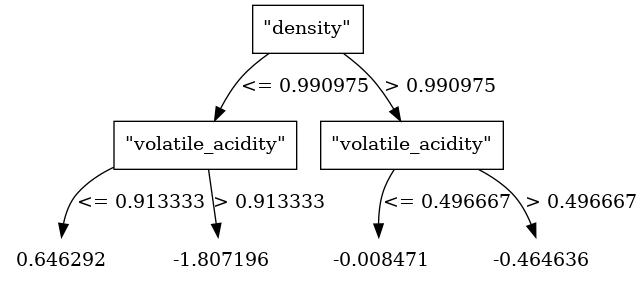
Tree models can be visualized by drawing their tree plots. For more examples, check out Machine Learning - Tree Plots.
model.plot_tree()
Note
The above example may not render properly in the doc because of the huge size of the tree. But it should render nicely in jupyter environment.
In order to plot graph using graphviz separately, you can extract the graphviz DOT file code as follows:
model.to_graphviz() Out[5]: 'digraph Tree {\ngraph [bgcolor="#FFFFFFDD"];\n0 [label="\\"density\\"", shape="box", style="filled", fillcolor="#FFFFFFDD", fontcolor="#000000", color="#000000"]\n0 -> 1 [label="<= 0.990975", color="#000000", fontcolor="#000000"]\n0 -> 2 [label="> 0.990975", color="#000000", fontcolor="#000000"]\n1 [label="\\"volatile_acidity\\"", shape="box", style="filled", fillcolor="#FFFFFFDD", fontcolor="#000000", color="#000000"]\n1 -> 3 [label="<= 0.913333", color="#000000", fontcolor="#000000"]\n1 -> 4 [label="> 0.913333", color="#000000", fontcolor="#000000"]\n2 [label="\\"volatile_acidity\\"", shape="box", style="filled", fillcolor="#FFFFFFDD", fontcolor="#000000", color="#000000"]\n2 -> 5 [label="<= 0.496667", color="#000000", fontcolor="#000000"]\n2 -> 6 [label="> 0.496667", color="#000000", fontcolor="#000000"]\n3 [label="0.646292", fillcolor="#FFFFFFDD", fontcolor="#000000", shape="none", color="#000000"]\n4 [label="-1.807196", fillcolor="#FFFFFFDD", fontcolor="#000000", shape="none", color="#000000"]\n5 [label="-0.008471", fillcolor="#FFFFFFDD", fontcolor="#000000", shape="none", color="#000000"]\n6 [label="-0.464636", fillcolor="#FFFFFFDD", fontcolor="#000000", shape="none", color="#000000"]\n}'
This string can then be copied into a DOT file which can beparsed by graphviz.
Contour plot is another useful plot that can be produced for models with two predictors.
model.contour()
Important
Machine learning models with two predictors can usually benefit from their own contour plot. This visual representation aids in exploring predictions and gaining a deeper understanding of how these models perform in different scenarios. Please refer to Contour Plot for more examples.
Model Register
In order to register the model for tracking and versioning:
model.register("model_v1")
Please refer to /notebooks/ml/model_tracking_versioning/index.ipynb for more details on model tracking and versioning.
Model Exporting
To Memmodel
model.to_memmodel()
Note
MemModelobjects serve as in-memory representations of machine learning models. They can be used for both in-database and in-memory prediction tasks. These objects can be pickled in the same way that you would pickle ascikit-learnmodel.The preceding methods for exporting the model use
MemModel, and it is recommended to useMemModeldirectly.To SQL
You can get the SQL query equivalent of the XGB model by:
model.to_sql() Out[6]: '((CASE WHEN "density" < 0.990975 THEN (CASE WHEN "volatile_acidity" < 0.913333 THEN 0.646292 ELSE -1.807196 END) ELSE (CASE WHEN "volatile_acidity" < 0.496667 THEN -0.008471 ELSE -0.464636 END) END) + (CASE WHEN "density" < 0.99484 THEN (CASE WHEN "density" < 0.990975 THEN 0.553633 ELSE 0.095356 END) ELSE (CASE WHEN "volatile_acidity" < 0.288333 THEN -0.016876 ELSE -0.332643 END) END) + (CASE WHEN "density" < 0.990975 THEN (CASE WHEN "volatile_acidity" < 0.496667 THEN 0.569315 ELSE 0.033093 END) ELSE (CASE WHEN "volatile_acidity" < 0.496667 THEN -0.021654 ELSE -0.407304 END) END)) * 0.1 + 5.80719645949586'
Note
This SQL query can be directly used in any database.
Deploy SQL
To get the SQL query which uses Vertica functions use below:
model.deploySQL() Out[7]: 'PREDICT_XGB_REGRESSOR("fixed_acidity", "volatile_acidity", "citric_acid", "residual_sugar", "chlorides", "density" USING PARAMETERS model_name = \'"public"."_verticapy_tmp_xgbregressor_v_mldb_c97ea83e979811efa8720242ac120002_"\', match_by_pos = \'true\')'
To Python
To obtain the prediction function in Python syntax, use the following code:
X = [[4.2, 0.17, 0.36, 1.8, 0.029, 0.9899]] model.to_python()(X) Out[9]: array([5.98412046])
Hint
The
to_python()method is used to retrieve predictions, probabilities, or cluster distances. For specific details on how to use this method for different model types, refer to the relevant documentation for each model.- __init__(name: str = None, overwrite_model: bool = False, max_ntree: int = 10, max_depth: int = 5, nbins: int = 32, split_proposal_method: Literal['local', 'global'] = 'global', tol: float = 0.001, learning_rate: float = 0.1, min_split_loss: float = 0.0, weight_reg: float = 0.0, sample: float = 1.0, col_sample_by_tree: float = 1.0, col_sample_by_node: float = 1.0) None
Must be overridden in the child class
Methods
__init__([name, overwrite_model, max_ntree, ...])Must be overridden in the child class
contour([nbins, chart])Draws the model's contour plot.
deploySQL([X])Returns the SQL code needed to deploy the model.
does_model_exists(name[, raise_error, ...])Checks whether the model is stored in the Vertica database.
drop()Drops the model from the Vertica database.
export_models(name, path[, kind])Exports machine learning models.
features_importance([tree_id, show, chart])Computes the model's features importance.
fit(input_relation, X, y[, test_relation, ...])Trains the model.
get_attributes([attr_name])Returns the model attributes.
get_match_index(x, col_list[, str_check])Returns the matching index.
Returns the parameters of the model.
get_plotting_lib([class_name, chart, ...])Returns the first available library (Plotly, Matplotlib, or Highcharts) to draw a specific graphic.
get_score([tree_id])Returns the feature importance metrics for the input tree.
get_tree([tree_id])Returns a table with all the input tree information.
get_vertica_attributes([attr_name])Returns the model Vertica attributes.
import_models(path[, schema, kind])Imports machine learning models.
plot([max_nb_points, chart])Draws the model.
plot_tree([tree_id, pic_path])Draws the input tree.
predict(vdf[, X, name, inplace])Predicts using the input relation.
register(registered_name[, raise_error])Registers the model and adds it to in-DB Model versioning environment with a status of 'under_review'.
regression_report([metrics])Computes a regression report
report([metrics])Computes a regression report
score([metric])Computes the model score.
set_params([parameters])Sets the parameters of the model.
Summarizes the model.
to_binary(path)Exports the model to the Vertica Binary format.
to_graphviz([tree_id, classes_color, ...])Returns the code for a Graphviz tree.
to_json([path])Creates a Python
XGBoostJSON fileConverts the model to an InMemory object that can be used for different types of predictions.
to_pmml(path)Exports the model to PMML.
to_python([return_proba, ...])Returns the Python function needed for in-memory scoring without using built-in Vertica functions.
to_sql([X, return_proba, ...])Returns the SQL code needed to deploy the model without using built-in Vertica functions.
to_tf(path)Exports the model to the Frozen Graph format (TensorFlow).
Attributes