
verticapy.machine_learning.memmodel.ensemble.RandomForestClassifier
- class verticapy.machine_learning.memmodel.ensemble.RandomForestClassifier(trees: list[BinaryTreeClassifier], classes: Annotated[list | ndarray, 'Array Like Structure'] | None = None)
InMemoryModelimplementation of the random forest classifier algorithm.Parameters
- trees: list[BinaryTreeClassifier]
listofBinaryTreefor classification.- classes: ArrayLike, optional
The model’s classes.
Attributes
Attributes are identical to the input parameters, followed by an underscore (‘_’).
Examples
Initalization
A Random Forest Classifier model is an ensemble of multiple binary tree classifier models. In this example, we will create three
BinaryTreeClassifiermodels:from verticapy.machine_learning.memmodel.tree import BinaryTreeClassifier model1 = BinaryTreeClassifier( children_left = [1, 3, None, None, None], children_right = [2, 4, None, None, None], feature = [0, 1, None, None, None], threshold = ["female", 30, None, None, None], value = [None, None, [0.8, 0.1, 0.1], [0.1, 0.8, 0.1], [0.2, 0.2, 0.6]], classes = ["a", "b", "c"], ) model2 = BinaryTreeClassifier( children_left = [1, 3, None, None, None], children_right = [2, 4, None, None, None], feature = [0, 1, None, None, None], threshold = ["female", 30, None, None, None], value = [None, None, [0.7, 0.2, 0.1], [0.3, 0.5, 0.2], [0.2, 0.2, 0.6]], classes = ["a", "b", "c"], ) model3 = BinaryTreeClassifier( children_left = [1, 3, None, None, None], children_right = [2, 4, None, None, None], feature = [0, 1, None, None, None], threshold = ["female", 30, None, None, None], value = [None, None, [0.4, 0.4, 0.2], [0.2, 0.2, 0.6], [0.2, 0.5, 0.3]], classes = ["a", "b", "c"], )
Now we will use above models to create
RandomForestClassifiermodel.from verticapy.machine_learning.memmodel.ensemble import RandomForestClassifier model_rfc = RandomForestClassifier( trees = [model1, model2, model3], classes = ["a", "b", "c"], )
Create a dataset.
data = [["male", 100], ["female", 20], ["female", 50]]
Making In-Memory Predictions
Use
predict()method to do predictions.model_rfc.predict(data) Out[8]: array(['a', 'b', 'c'], dtype='<U1')
Use
predict_proba()method to compute the predicted probabilities for each class.model_rfc.predict_proba(data) Out[9]: array([[1. , 0. , 0. ], [0. , 0.66666667, 0.33333333], [0. , 0.33333333, 0.66666667]])
Deploy SQL Code
Let’s use the following column names:
cnames = ["sex", "fare"]
Use
predict_sql()method to get the SQL code needed to deploy the model using its attributes.model_rfc.predict_sql(cnames) Out[11]: "CASE WHEN sex IS NULL OR fare IS NULL THEN NULL WHEN ((CASE WHEN sex = 'female' THEN (CASE WHEN fare < 30 THEN 0.0 ELSE 1.0 END) ELSE 0.0 END) + (CASE WHEN sex = 'female' THEN (CASE WHEN fare < 30 THEN 0.0 ELSE 1.0 END) ELSE 0.0 END) + (CASE WHEN sex = 'female' THEN (CASE WHEN fare < 30 THEN 1.0 ELSE 0.0 END) ELSE 0.0 END)) / 3 >= ((CASE WHEN sex = 'female' THEN (CASE WHEN fare < 30 THEN 0.0 ELSE 0.0 END) ELSE 1.0 END) + (CASE WHEN sex = 'female' THEN (CASE WHEN fare < 30 THEN 0.0 ELSE 0.0 END) ELSE 1.0 END) + (CASE WHEN sex = 'female' THEN (CASE WHEN fare < 30 THEN 0.0 ELSE 0.0 END) ELSE 1.0 END)) / 3 AND ((CASE WHEN sex = 'female' THEN (CASE WHEN fare < 30 THEN 0.0 ELSE 1.0 END) ELSE 0.0 END) + (CASE WHEN sex = 'female' THEN (CASE WHEN fare < 30 THEN 0.0 ELSE 1.0 END) ELSE 0.0 END) + (CASE WHEN sex = 'female' THEN (CASE WHEN fare < 30 THEN 1.0 ELSE 0.0 END) ELSE 0.0 END)) / 3 >= ((CASE WHEN sex = 'female' THEN (CASE WHEN fare < 30 THEN 1.0 ELSE 0.0 END) ELSE 0.0 END) + (CASE WHEN sex = 'female' THEN (CASE WHEN fare < 30 THEN 1.0 ELSE 0.0 END) ELSE 0.0 END) + (CASE WHEN sex = 'female' THEN (CASE WHEN fare < 30 THEN 0.0 ELSE 1.0 END) ELSE 0.0 END)) / 3 THEN 'c' WHEN ((CASE WHEN sex = 'female' THEN (CASE WHEN fare < 30 THEN 1.0 ELSE 0.0 END) ELSE 0.0 END) + (CASE WHEN sex = 'female' THEN (CASE WHEN fare < 30 THEN 1.0 ELSE 0.0 END) ELSE 0.0 END) + (CASE WHEN sex = 'female' THEN (CASE WHEN fare < 30 THEN 0.0 ELSE 1.0 END) ELSE 0.0 END)) / 3 >= ((CASE WHEN sex = 'female' THEN (CASE WHEN fare < 30 THEN 0.0 ELSE 0.0 END) ELSE 1.0 END) + (CASE WHEN sex = 'female' THEN (CASE WHEN fare < 30 THEN 0.0 ELSE 0.0 END) ELSE 1.0 END) + (CASE WHEN sex = 'female' THEN (CASE WHEN fare < 30 THEN 0.0 ELSE 0.0 END) ELSE 1.0 END)) / 3 THEN 'b' ELSE 'a' END"
Use
predict_proba_sql()method to get the SQL code needed to deploy the model probabilities using its attributes.model_rfc.predict_proba_sql(cnames) Out[12]: ["((CASE WHEN sex = 'female' THEN (CASE WHEN fare < 30 THEN 0.0 ELSE 0.0 END) ELSE 1.0 END) + (CASE WHEN sex = 'female' THEN (CASE WHEN fare < 30 THEN 0.0 ELSE 0.0 END) ELSE 1.0 END) + (CASE WHEN sex = 'female' THEN (CASE WHEN fare < 30 THEN 0.0 ELSE 0.0 END) ELSE 1.0 END)) / 3", "((CASE WHEN sex = 'female' THEN (CASE WHEN fare < 30 THEN 1.0 ELSE 0.0 END) ELSE 0.0 END) + (CASE WHEN sex = 'female' THEN (CASE WHEN fare < 30 THEN 1.0 ELSE 0.0 END) ELSE 0.0 END) + (CASE WHEN sex = 'female' THEN (CASE WHEN fare < 30 THEN 0.0 ELSE 1.0 END) ELSE 0.0 END)) / 3", "((CASE WHEN sex = 'female' THEN (CASE WHEN fare < 30 THEN 0.0 ELSE 1.0 END) ELSE 0.0 END) + (CASE WHEN sex = 'female' THEN (CASE WHEN fare < 30 THEN 0.0 ELSE 1.0 END) ELSE 0.0 END) + (CASE WHEN sex = 'female' THEN (CASE WHEN fare < 30 THEN 1.0 ELSE 0.0 END) ELSE 0.0 END)) / 3"]
Hint
This object can be pickled and used in any in-memory environment, just like SKLEARN models.
Drawing Trees
Use
plot_tree()method to draw the input tree.model_rfc.plot_tree(tree_id = 0)
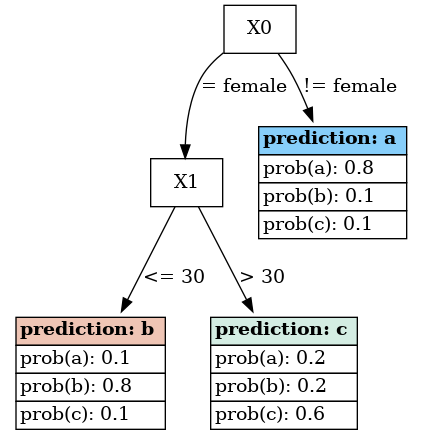
Important
plot_tree()requires the Graphviz module.Note
The above example is a very basic one. For other more detailed examples and customization options, please see :ref:`chart_gallery.tree`_
- __init__(trees: list[BinaryTreeClassifier], classes: Annotated[list | ndarray, 'Array Like Structure'] | None = None) None
Methods
__init__(trees[, classes])Returns the model attributes.
plot_tree([pic_path, tree_id])Draws the input tree.
predict(X)Predicts using the input matrix.
Computes the model's probabilites using the input matrix.
Returns the SQL code needed to deploy the model using its attributes.
predict_sql(X)Returns the SQL code needed to deploy the model.
set_attributes(**kwargs)Sets the model attributes.
Attributes
Must be overridden in child class