Eon Mode Architecture
Eon Mode separates the computational resources from the communal storage layer of your database. This separation gives you the ability to store your data in a single location (currently, only in S3 on AWS). You can elastically vary the number of compute nodes connected to that location according to your computational needs. Adjusting the size of your cluster does not interrupting analytic workloads.
The entire Eon Mode cluster, both storage and compute, resides in the cloud. Currently, the only cloud provider that Eon Mode supports is Amazon's AWS.
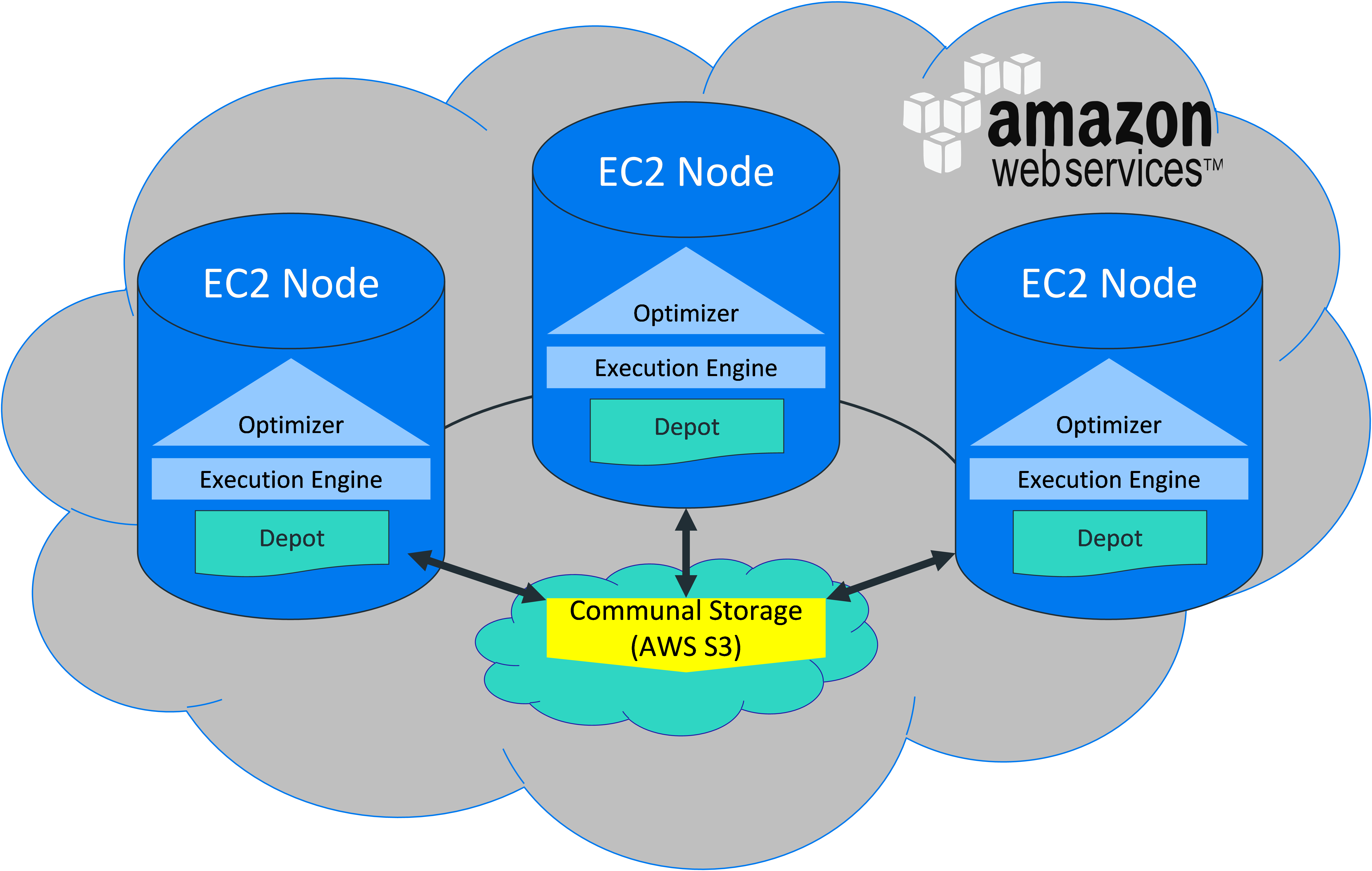
Eon Mode is suited to a range of needs and data volumes. Because compute and storage are separate, you can scale them separately.

Communal Storage
Instead of storing data locally, Eon Mode uses a single communal storage location for all data and the catalog (metadata). Communal storage is the database's centralized storage location, shared among the database nodes.
Communal storage has the following properties:
- Communal storage in the cloud is more resilient and less susceptible to data loss due to storage failures than storage on disk on individual machines.
- Any data can be read by any compute node using the same path.
- Capacity is not limited by disk space on compute nodes.
- Because data is stored communally, you can elastically scale your cluster to meet changing demands.
Vertica currently supports communal storage in Amazon S3.
Communal storage locations are listed in the STORAGE_LOCATIONS system table with a SHARING_TYPE of COMMUNAL.
Within communal storage, data is divided into portions called shards. Compute nodes subscribe to particular shards, with subscriptions balanced among the compute nodes. See Shards and Subscriptions.
Compute Nodes
Compute nodes are responsible for all data processing and computations. A compute node stores a copy of frequently queried data and a portion of the catalog that represents the shards that this node subscribes to.
Each compute node subscribes to one or more shards. Data for subscribed shards is kept in the depot, a cache-like component. This intermediate layer of data storage provides a faster copy of the data that is local to the node. Data that is frequently used in your queries takes priority in your depot. If the data for a query is not in the depot, then Vertica might need to read data from communal storage. The depot improves query performance by preventing some queries from making the round-trip to communal storage.
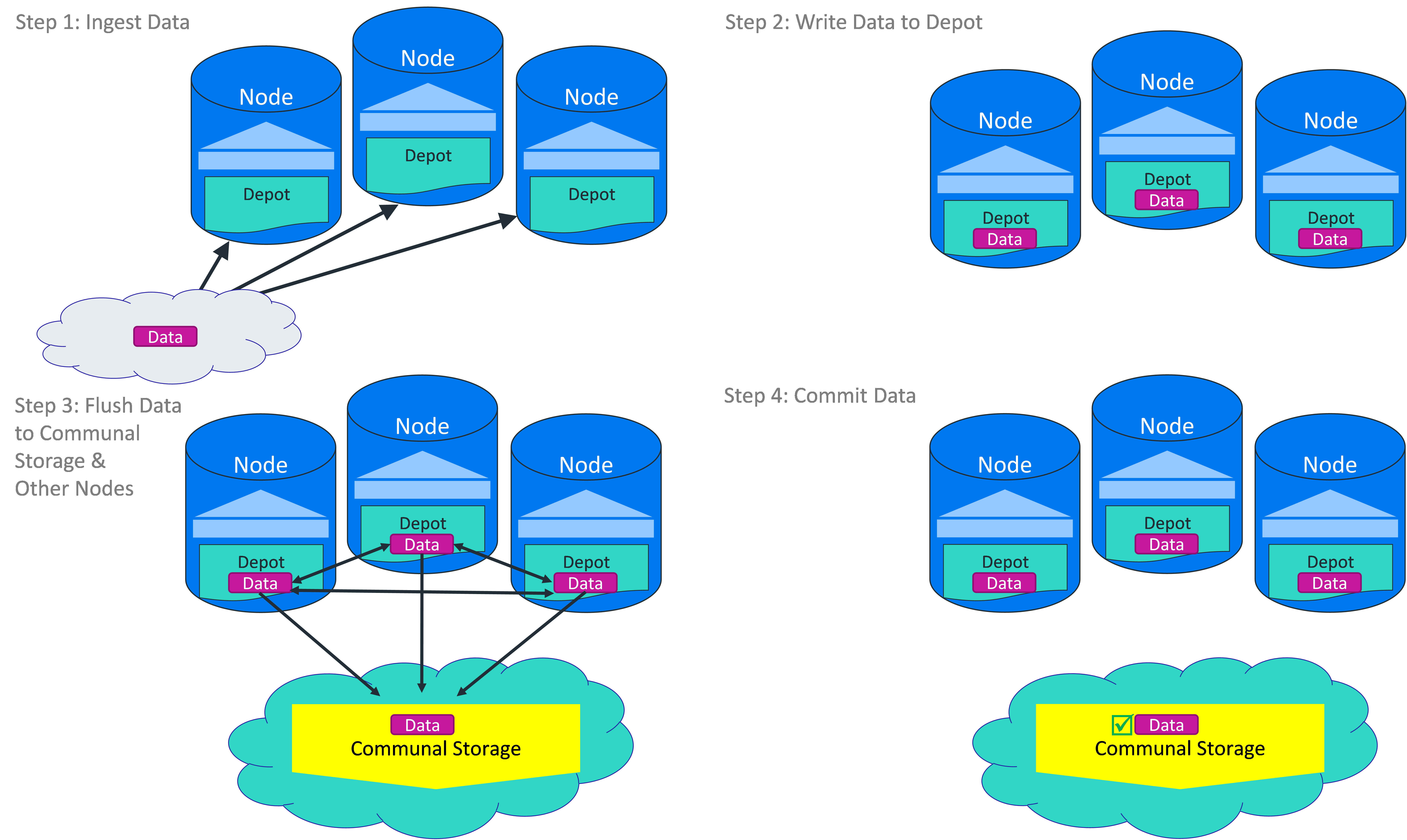
The depot is also used to store newly-loaded data before shipping it to communal storage. Data loads therefore do not have to wait for writes to communal storage; Vertica writes the data locally and, separately, ships it to communal storage. Nodes also directly exchange the data they load with other nodes. This feature makes querying newly loaded data more efficient because nodes subscribed to the shard containing new newly loaded data do not have to wait for the data to be sent to the communal storage and then retrieve it themselves. Having nodes shared their loaded data directly prevents bottlenecks from occurring between the nodes and the communal storage.
By default, the depot is set to be 80% of the disk space on the node.
Each compute node also stores a local copy of the database catalog.
Workload Isolation
Eon Mode lets you divide up your compute nodes to isolate workloads from one another. You create this isolation using a Vertica feature named fault groups. In Enterprise Mode, fault groups help you organize your Vertica cluster to avoid downtime in case of node failure. In Eon Mode, you use this feature to group together nodes and assign them workloads. See Subclusters for more information.
Loading Data
In Eon Mode, COPY statements write to Read Optimized Store (ROS) files in a node's depot to improve performance. The COPY statement segments, sorts, and compresses for high optimization. Before the statement commits, Vertica ships the ROS files to communal storage. Eon Mode does not use the Write Optimized Storage (WOS).
Because a load is buffered in the depot on the node executing the load, the size of your depot limits the amount of data you can load in a single operation. Unless you perform multiple loads in parallel sessions, you are unlikely to encounter this limit.
At load time, files are written to the depot and synchronously sent to communal storage and all the nodes that subscribe to the shard in which the data is being loaded. This mechanism of sending data to peers at load time improves performance if a node goes down, because the cache of the peers who take over for the down node is already warm. The file compaction mechanism (mergeout) puts its output files into the cache and also uploads them to the communal storage.
The following diagram shows the flow of data during a copy statement.
Querying Data
Vertica uses a slightly different process to plan queries in Eon Mode to incorporate the sharding mechanism and remote storage. Instead of using a fixed-segmentation scheme to distribute data to each node, Vertica uses the sharding mechanism to segment the data into a specific number of shards that at least one (and usually more) nodes subscribes to. When the optimizer selects a projection, the layout for the projection is determined by the participating subscriptions for the session. The optimizer generates query plans that are equivalent to those in Enterprise Mode. Only nodes that the session selects to serve a shard participate in query execution.
Vertica first tries to use data in the depot to resolve a query. When the data in the depot cannot resolve the query, Vertica reads from the communal storage. You could see an impact on query performance when a substantial number of your queries read from the communal storage. If this is the case, then you should consider re-sizing your depot or use depot system tables to get a better idea of what is causing the issue. You can use ALTER_LOCATION_SIZE to change depot size.
